
Apeaksoft MobieTrans Review: Does It Offer Seamless Transfers
TL;DR:
Admittedly, Apeaksoft MobieTrans is indeed a tool worth considering in some aspects. Yet, MobiKin Transfer for Mobile offers similar core functions like cross-device transfer, but it focuses more on simple one-click phone migration and stable device-to-device transfers, making it a practical alternative for users who want a straightforward switching tool.
This passage provides a detailed Apeaksoft MobieTrans review, covering its core functions, usability, and overall performance in real-world use. It also highlights key considerations such as options with faster transfers, broader device compatibility, and higher cost performance that users often compare when evaluating similar tools.
In addition, it points out situations where a more dependable alternative may be preferred for smoother and more flexible phone data migration.
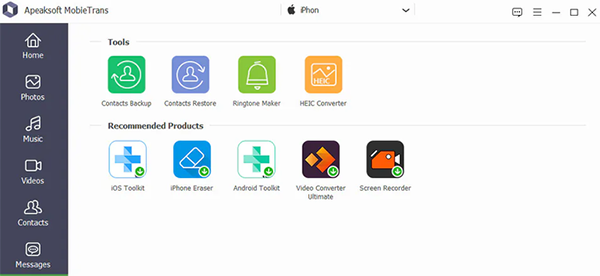
Part 1: What Is Apeaksoft MobieTrans
Apeaksoft MobieTrans is a desktop phone management tool that lets you transfer photos, videos, music, contacts, messages, and other files between Android devices, iPhones/iPads, and Windows computers.
It also includes features for organizing contacts and media, along with utilities such as a HEIC converter, ringtone maker, and contacts backup and restore. The software is suitable for users who want to migrate data between devices or manage their mobile content from a computer.
Part 2: Key Features of Apeaksoft MobieTrans
The table below summarizes the main features of Apeaksoft MobieTrans and what each one is used for. It gives a quick overview of its transfer, management, and built-in utility functions.
|
Feature
|
Description
|
|
Phone-to-Phone Transfer |
Transfers data between Android and iPhone devices. |
|
PC-to-Phone Transfer |
Imports and exports files between a phone and a Windows PC. |
|
Photo Manager |
Organizes, transfers, and manages photos and albums. |
|
Music Manager |
Transfers music, manages playlists, and creates ringtones. |
|
Video Manager |
Transfers, previews, and deletes videos. |
|
Contacts Manager |
Edits, transfers, groups, and removes duplicate contacts. |
|
Message Manager |
Exports and backs up SMS conversations. |
|
Contacts Backup & Restore |
Backs up and restores contacts locally. |
|
HEIC Converter |
Converts HEIC images to JPG or PNG. |
|
Ringtone Maker |
Creates custom ringtones from audio or video. |
|
File Management |
Adds, deletes, renames, and organizes phone files. |
Part 3: Is Apeaksoft MobieTrans Safe and Easy to Use
Safety:
Apeaksoft MobieTrans is generally safe when downloaded from its official website or trusted sources. It works locally on your computer to manage and transfer phone data, but users should avoid unofficial downloads and only grant necessary device permissions.
User Guide
- Install Apeaksoft MobieTrans on your Windows computer and launch the program after the setup is complete.
- Connect your Android or iPhone to the computer using a USB cable, then enable necessary permissions like "Trust This Computer" or USB debugging.
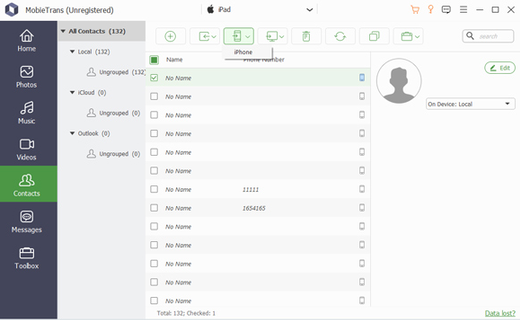
- Select a working mode such as phone-to-phone transfer, phone-to-PC transfer, or file management from the main interface.
- Choose the data types you want to manage or transfer, such as contacts, photos, videos, music, or messages.
- Click the corresponding action button (Transfer, Export, Import, or Delete) to start and complete the process.
Is Apeaksoft MobieTrans free to use? Apeaksoft MobieTrans is not fully free to use, but it does provide a trial version with limited features for testing. Its official pricing is usually structured as a 1-month plan (around $19.95), 1-year plan (around $39.95), and lifetime license (around $59.95), though prices may vary with promotions. Full functionality is unlocked only after purchasing one of these paid plans.
Part 4: Pros and Cons of Apeaksoft MobieTrans
Apeaksoft MobieTrans offers a range of useful features for transferring and managing mobile data across Android, iOS, and Windows devices. The table below highlights its main advantages and limitations to give a balanced overview of the software.
|
The Good
|
The Bad
|
|
Easy-to-use interface suitable for beginners |
Limited free trial features |
|
Supports iOS to/from Android to/from PC data transfer |
Can be slow with large media libraries |
|
Transfers photos, videos, music, contacts, SMS |
Requires USB connection and setup permissions |
|
One-click cross-device transfer function |
Some advanced features require purchase |
|
Includes extras like HEIC converter and ringtone maker |
Occasional stability issues on older devices |
|
Helps manage and organize phone data on PC |
Not all app data (e.g., WhatsApp) is supported |
Part 5: FAQs about Apeaksoft MobieTrans
Q1. What devices does it support?
It supports a wide range of devices, including Android smartphones, iPhones, iPads, and Windows PCs for cross-platform data handling.
Q2. What files can it transfer?
It can move common data types such as photos, videos, music, contacts, SMS messages, and other media files between devices.
Q3. Do I need iTunes to use it?
No, it works independently of iTunes, allowing iPhone users to transfer and manage data without Apple’s official software.
Q4. Does it require a USB connection?
Yes, a USB cable is typically required to connect your phone to the computer for stable recognition and data transfer.
Q5. Can it transfer WhatsApp data?
No, it does not support full WhatsApp chat transfer or backup, focusing instead on standard phone data like media and contacts.
Q6. Can it manage files on my phone?
Yes, it lets you directly organize files by adding, deleting, editing, and exporting data from your mobile device through the computer.
Q7. Does Apeaksoft MobieTrans support wireless transfer?
No, it mainly relies on USB connections to ensure stable and fast data transfer between devices and computers.
Q8. Does it work on Mac computers?
It is mainly designed for Windows systems, and Mac compatibility is limited or not officially supported.
Q9. Will it delete my existing data during transfer?
No, it does not overwrite data unless you manually choose to delete or replace files.
Part 6: Best Replacement for Apeaksoft MobieTrans
A data transfer utility designed for Android and iOS devices also supports computer connections, and MobiKin Transfer for Mobile (Windows/Mac) helps move contacts, messages, photos, music, and videos with ease. It allows quick device switching through one-click copy and offers selective file type transfer for more control over what gets moved.
With stable USB-based operation and broad device support, it works well as an alternative to Apeaksoft MobieTrans for straightforward phone data migration.
Key Functions of MobiKin Transfer for Mobile
> Cross-platform transfer – Moves data between Android, iOS, and computers.
> One-click phone switch – Transfers contacts, messages, photos, music, and videos during upgrades.
> Selective transfer – Lets users choose specific files or data types.
> Seamless transfer – Migrates contacts, text messages, media, and more safely between devices.
> Wide compatibility – Supports most Android and iOS versions.
> USB connection – Provides stable and fast transfers without internet.


Quick User Guide:
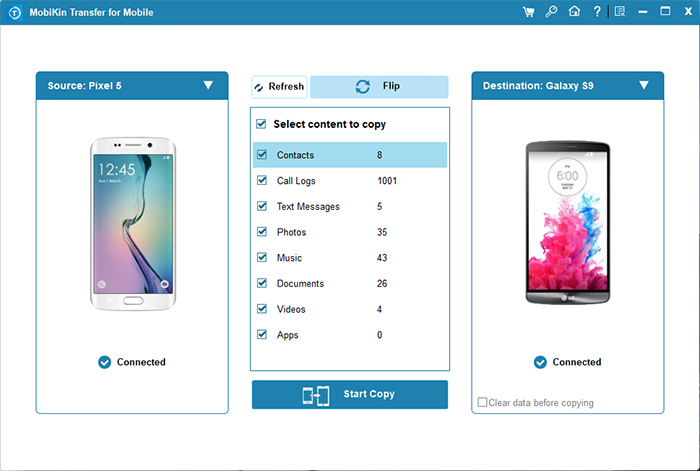
Step 1: Connect Your Devices - Launch the installed software and connect both your old and new phones to your computer. Follow the on-screen instructions to ensure both devices are detected.
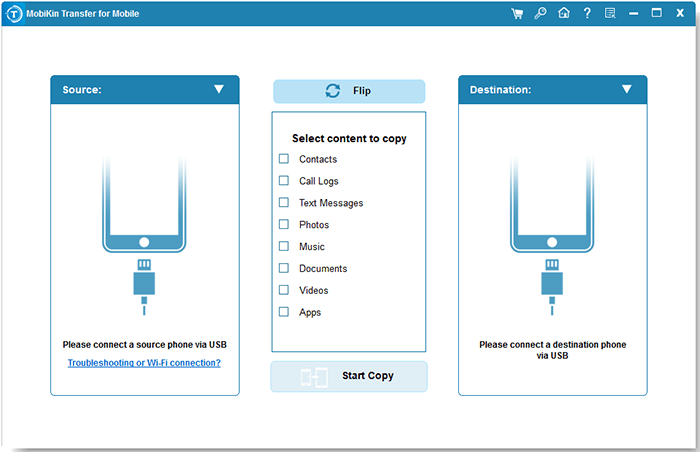
Step 2: Confirm Source and Destination - Verify that your old phone is set as the "Source" and your new phone as the "Destination." If they are reversed, click the "Flip" button to swap them.
Step 3: Select and Start Transfer - Select the file types you wish to move to your new device, then click "Start Copy" to begin the transfer.
Video Guide:
Related Articles:
[4 Solutions] How to Sync Calendars Between Two Android Phones?
6 Ingenious Methods to Copy iPhone Voice Memos to PC/Computer
How to Transfer Data from TECNO to iPhone? [With Steps & Cons]
4 Methods: Transfer Photos from realme Phone to USB Flash Drive
