
Easy Samsung FRP Tool Review: Objective Analysis [Up-to-date]
If you've ever been locked out of a Samsung device after a factory reset, you may have come across the Easy Samsung FRP Tool as a possible solution. Many users search for an Easy Samsung FRP Tool review because they want to understand whether the software is genuinely effective at bypassing FRP locks on Samsung devices and whether it's reliable enough for everyday users.
In this review, we'll take a closer look at what the tool offers, how well it performs, and whether it's truly worth relying on when you're locked out of your Samsung phone.

- Part 1: Easy Samsung FRP Tool: Overview
- Part 2: Easy Samsung FRP Tool: Safety & Security
- Part 3: Easy Samsung FRP Tool: How-to Guide
- Part 4: Easy Samsung FRP Tool: Bug Fixes
- Part 5: Easy Samsung FRP Tool: FAQs
- Part 6: Easy Samsung FRP Tool: Merits & Demerits
- Part 7: Easy Samsung FRP Tool: A More Reliable Alternative
Part 1: Easy Samsung FRP Tool: Overview
The Easy Samsung FRP Tool is a free utility designed to help users remove Factory Reset Protection (FRP) from Samsung phones and tablets. FRP is a Google security feature that prevents unauthorized access to a device after a factory reset by requiring the previously synced Google account.
When you're locked out - such as after buying a used device without credentials - this tool offers a straightforward way to bypass Google verification. It supports a wide range of Samsung models and aims to make the unlocking process simple and user-friendly.
You May Also Like: Samsung Broken Screen Data Recovery: 6 Ways to Make It a Lot Easier
Part 2: Easy Samsung FRP Tool: Safety & Pricing
The table below summarizes the key safety and pricing aspects of the Easy Samsung FRP Tool, highlighting its purpose, compatibility, pricing, and potential risks:
|
Category
|
Details
|
|
Safety (Download Source) |
Safe if downloaded from a trusted site or official forum; unknown or repackaged versions may contain malware. |
|
Legal/Ethical Use |
Intended for legitimate device owners; bypassing security on unauthorized or stolen devices is illegal. |
|
Free/Paid Status |
The core tool itself is generally free to download; some services or advanced support may charge fees. |
|
Malware Risk |
Higher risk if downloaded from unverified third-party sources; official or trusted sources reduce this risk. |
|
Pricing Comparison |
Similar FRP services or tools may require payment per unlock, but the basic Easy Samsung FRP Tool is usually free. |
|
Security Implications |
Bypassing FRP lowers the built-in Google/Samsung security barrier and should only be used for legitimate recovery; improper use can expose device vulnerabilities. |
Part 3: Easy Samsung FRP Tool: How-to Guide
To bypass the FRP lock on your Samsung device using the Easy Samsung FRP Tool, simply follow the guided setup process on both your computer and phone. The steps below walk you through downloading the tool, preparing your PC, and unlocking your device safely and efficiently (Want to get out of a locked Samsung?):
- Download the Tool - Get the Easy Samsung FRP Tool (e.g., V2.7) from the Easy-Firmware website or another trusted source and avoid unsafe download sites.
- Extract the File - Unzip the downloaded package to a folder on your computer.
- Run the Program - Double-click the .exe file to launch the tool.
- Disable Driver Signature Enforcement - Click "Disable Drivers Signatures" in the left panel and reboot your PC when prompted.
- Connect Your Samsung Device - Attach your phone to the computer via USB and ensure it is already connected to Wi-Fi.
- Start the Bypass Process - Open the tool and click "Bypass FRP." Follow the instructions that appear on your device.
- Open the Webpage - When the Easy Firmware pop-up appears on your phone, tap "View," which opens a browser with the YouTube Terms of Service page.
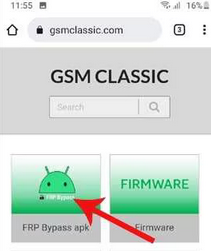
- Access APK Resources - In the browser search bar, type gsmclassic.com and navigate to the FRP Bypass APK section.
- Install the APK Tool - Choose "Direct Set Screen Locks."
- Create a New Screen Lock - Set a PIN, pattern, or password when prompted.
- Restart the Phone - Reboot your Samsung device and go through the setup again using the new lock credentials. (What if your phone keeps restarting?)
Part 4: Easy Samsung FRP Tool: Bug Fixes
If the Easy Samsung FRP Tool fails to bypass your device, there are several troubleshooting steps you can try to resolve the issue. The list below covers common fixes, from checking connections and Wi-Fi to updating the tool or using alternative FRP methods.
- Restart both your Samsung device and computer, then reconnect and try the tool again.
- Check your USB connection to ensure the cable and port are working properly.
- Verify Wi-Fi is enabled on the Samsung device, as FRP bypass requires internet access.
- Disable antivirus or firewall software temporarily, since it may block the tool from running.
- Download the latest version of the Easy Samsung FRP Tool, as older versions may not support newer Android builds.
- Try another FRP bypass APK or method, because some APKs only work on specific Android versions.
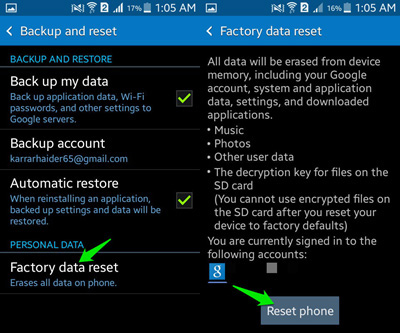
- Perform a factory reset again from Recovery Mode and retry the bypass afterward.
- Consider using a professional FRP removal program or contacting Samsung support if the issue persists.
Part 5: Easy Samsung FRP Tool: FAQs
Q1: Which Samsung devices are supported?
The tool supports a wide range of Samsung smartphones and tablets, including models from Galaxy S, Note, A, M, and J series. It works with devices running multiple Android versions, though compatibility may vary slightly depending on the Android build.
Q2: Do I need an internet connection on my phone?
Yes, the tool often requires access to online resources and APK installations, which cannot occur without internet access. Additionally, some FRP bypass steps involve opening web pages on the locked device to download necessary bypass APKs.
Q3: Can Easy Samsung FRP Tool remove the Google account permanently?
No, the tool bypasses the FRP lock so you can access the device but it does not delete the Google account from Google's servers. It only allows the device to skip the account verification step.
Q4: Can I use it on a non-Samsung Android device?
No, this tool is specifically designed for Samsung smartphones and tablets and may not work on other brands such as Xiaomi, Huawei, or Motorola.
Part 6: Easy Samsung FRP Tool: Merits & Demerits
Merits:
- Free to download and use for most Samsung devices.
- Supports a wide range of Samsung smartphones and tablets.
- User-friendly interface with guided instructions for bypassing FRP.
- Allows legitimate users to regain access to locked devices
- Can bypass FRP without erasing all personal data on the device.
- Lightweight and doesn't require high system resources.
- Helps users who bought second-hand devices with FRP enabled.
Demerits:
- Only works on Samsung devices; not compatible with other Android brands.
- May fail on newer Android versions due to updated security measures.
- Requires a stable USB connection and active Wi-Fi on the phone.
- Downloading from untrusted sources can expose devices to malware.
- Misuse of unauthorized devices is illegal.
- Some advanced features or automated support may require payment.
- Bypassing FRP lowers the security barrier, potentially exposing the device to risks.
Part 7: Easy Samsung FRP Tool: A More Reliable Alternative
One major shortcoming of Easy Samsung FRP Tool is that it may fail on newer Android versions and only works with Samsung devices, limiting its usability. It also requires careful handling to avoid malware from untrusted sources and bypassing a security feature, which can pose risks if misused.
Android LockWiper is a superior alternative because it supports a wider range of Android brands and versions, offers a more reliable FRP bypass process, and provides a safer, user-friendly interface for unlocking devices.

Core Features:
- Bypass FRP without data loss on Samsung devices.
- High success rate for unlocking even newer Android versions.
- Wide device compatibility, including the latest Samsung Galaxy S25.
- Remove Google account verification quickly and securely.
- Unlock screen locks: PIN, pattern, password, fingerprint, face ID.
- User-friendly interface with step-by-step guidance.
- No risky APK downloads or complex manual steps required.
- Professional support and updates for reliability.
How to Use?
- Begin the procedure by downloading and installing the software on your computer.
- Select 'Remove Google Lock (FRP)' and opt for 'Advanced Mode.'
- Connect your Samsung device to the PC using a USB cable, then click 'Start.'
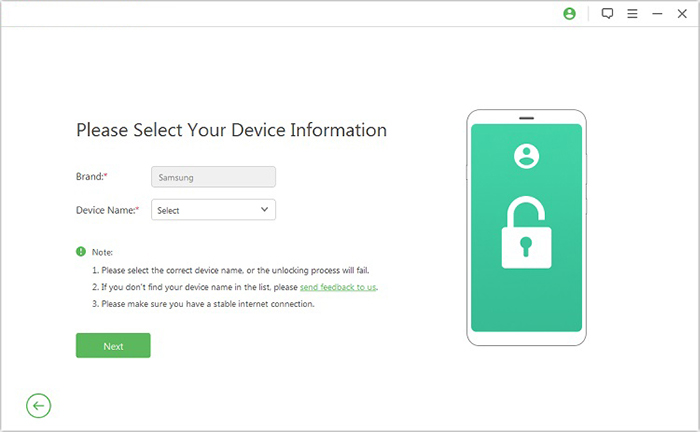
- Adhere to the instructions to input the necessary details regarding your Galaxy device and click 'Next.'
- Make sure to follow the on-screen prompts to enter recovery mode.
- On the following screen, choose the correct PDA, country, and carrier, then click 'Download' to retrieve the required data package.
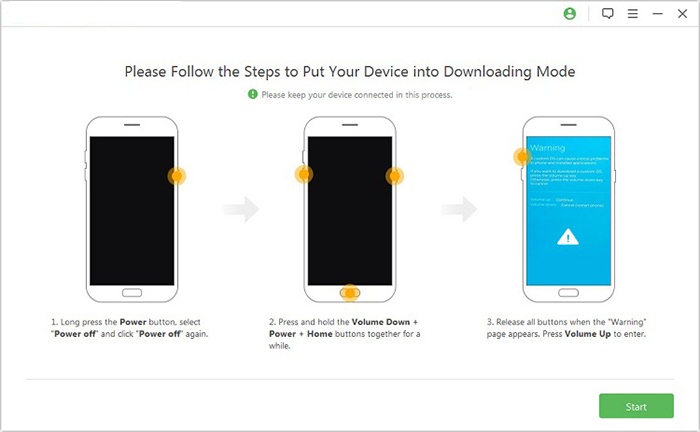
- Subsequently, click 'Start to Extract' and follow the on-screen instructions to put your device into Download Mode.
- Enable USB debugging, activate OEM unlock, and extract the firmware, among other essential tasks.
- Finally, the software will initiate the unlocking process for your Samsung device.
- Once completed, you will successfully remove the Google Verification Code from your Samsung.
Closing Words
By and large, Easy Samsung FRP Tool can work in certain situations, especially on older Samsung models. It also comes with limitations, potential compatibility issues, and some security concerns depending on where it's downloaded from.
Assuming you want a more stable, professional, and user-friendly experience, just try Android Lock Wiper. This software offers broader device support, a higher success rate, and safer operation without complicated manual steps.
Related Articles:
Top 8 iCloud Bypass Tools to Remove Activation Lock from iPhone/iPad
11 Most Wonderful Samsung Backup Software [Free & Paid]
How to Use Smart Switch with Broken Screen Across Platforms [2026]
How to Recover Data from Water Damaged Samsung Phone? 4 Reliable Means
