
TMT Qualcomm Tool V2.0 Review 2026: Not Limited to FRP Bypass
TL;DR:
All in all, TMT Qualcomm Tool V2.0's functions appeal to technicians who need reliable solutions for FRP bypass, IMEI repair, and firmware restoration. However, it only works for some realme and OPPO devices. On the contrary, Android Lock Wiper serves as a practical alternative, offering screen lock removal, FRP bypass, and Samsung unlocking without data loss, with broader support for thousands of devices and newer Android versions.
NOTE: TMT Qualcomm Tool V2.0, along with its leading alternative Android Lock Wiper, is designed to be used only with the informed consent of the device's rightful owner.
Among mobile repair enthusiasts and technicians, TMT Qualcomm Tool V2.0 has become one of the most popular utilities for unlocking, flashing, and repairing Qualcomm-based phones. Its reputation stems from the ability to handle complex tasks such as FRP bypass, IMEI repair, and ROM flashing. This review explores its strengths, limitations, and practical value for those who rely on it in professional or personal repair work.
- Part 1: What Is TMT Qualcomm Tool V2.0
- Part 2: TMT Qualcomm Tool V2.0 - Key Features
- Part 3: TMT Qualcomm Tool V2.0 - Supported Models
- Part 4: How to Download, Install, and Use TMT Qualcomm Tool V2.0
- Part 5: Pros and Cons of TMT Qualcomm Tool V2.0
- Part 6: A Better TMT Qualcomm Tool V2.0 Alternative [Widely Compatible]
- FAQs about TMT Qualcomm Tool V2.0
Part 1: What Is TMT Qualcomm Tool V2.0
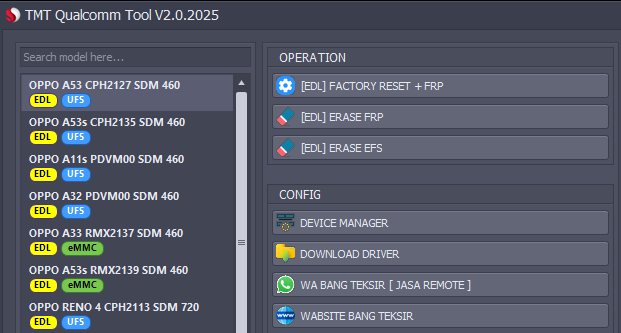
According to available information, TMT Qualcomm Tool V2.0 is a free Windows utility developed for Android devices powered by Qualcomm chipsets, allowing users to perform operations such as FRP bypass, factory reset, and EDL-based maintenance.
It works mainly in EDL (Emergency Download) mode and includes features like erasing FRP, wiping EFS, reading device information, and accessing Qualcomm USB drivers. The tool is primarily aimed at mobile repair technicians and advanced users who need to troubleshoot or unlock supported Qualcomm phones.
You Might Also Like: An Unbiased MobileTeamOfficial FRP Bypass APK Review [Latest Update]
Part 2: TMT Qualcomm Tool V2.0 - Key Features
TMT Qualcomm Tool V2.0 offers a variety of functions for servicing Qualcomm-powered Android phones. The table below summarizes its main features and what each one can do for FRP removal, device repair, and EDL-mode operations.
|
TMT Qualcomm Tool V2.0 - Feature
|
Key Details
|
|
EDL Factory Reset + FRP |
Performs a factory reset and removes the Google FRP lock in one operation while the phone is in EDL mode. |
|
EDL Erase FRP |
Deletes the Factory Reset Protection lock without flashing firmware or using Google account credentials. |
|
EDL Erase EFS |
Erases the EFS partition to help resolve certain network, IMEI, or signal-related issues. |
|
Read Device Information |
Retrieves basic device details, helping users confirm the connected Qualcomm model and status. |
|
Reboot to 9008 (EDL) Mode |
Allows supported devices to reboot directly into Qualcomm's Emergency Download (9008) mode for servicing. |
|
Unlock Bootloader |
Provides an option to unlock the bootloader on supported Qualcomm devices. |
|
Flash Firmware |
Supports flashing stock firmware to repair software corruption, boot loops, or system errors. |
|
Remove Screen Lock |
Can erase screen locks such as PIN, password, or pattern on compatible devices. |
|
Qualcomm Driver Download |
Includes a shortcut for downloading and installing Qualcomm USB drivers required for EDL communication. |
Part 3: TMT Qualcomm Tool V2.0 - Supported Models
Key Notes:
- The tool mainly supports Qualcomm Snapdragon devices only.
- Most supported phones are from OPPO and realme mid-range series.
- Compatibility depends heavily on EDL mode access and chipset support.
OPPO Supported Models (CPH Series)
- OPPO A53 (CPH2127) – Snapdragon 460
- OPPO A53s (CPH2135) – Snapdragon 460
- OPPO A11s (PDVM00) – Snapdragon 460
- OPPO A33 (CPH2137) – Snapdragon 460
- OPPO A73 (CPH2099)
- OPPO A74 (CPH2219)
- OPPO A76 (CPH2375)
- OPPO A95 (CPH2365)
- OPPO A96 (CPH2333)
- OPPO F17 (CPH2095)
- OPPO F19 (CPH2219)
- OPPO Reno 4 (CPH2113) – Snapdragon 720
- OPPO Reno 5 (CPH2159) – Snapdragon 720
- OPPO Reno 6 (CPH2235) – Snapdragon 720
- OPPO Reno 7 (CPH2363)
realme Supported Models (RMX Series)
- realme 7i (RMX2103)
- realme C17 (RMX2101
- realme C15 (RMX2195)
- realme 8 (RMX3081)
- realme 6 Pro (RMX2061)
- realme 7 Pro (RMX2170)
- realme 9 (RMX3521)
- realme X2 Pro (RMX1931)
- realme X3 (RMX2081)
- realme Super Z (RMX2085)
Click to Explore: How can I unlock OPPO phone without a password? Here are the 7 most reliable solutions.
Part 4: How to Download, Install, and Use TMT Qualcomm Tool V2.0
How to Download?
- To get TMT Qualcomm Tool V2.0, download the latest version from a trusted source or the provided download link.
- Once you click the download button, choose a folder on your computer to save the file and wait for the download to complete before extracting it.
How to Install?
- After downloading, extract the ZIP/RAR file to your desktop and temporarily disable antivirus software to avoid installation blocking.
- Then run the setup file and follow the on-screen instructions, ensuring Qualcomm drivers are properly installed before connecting your device to the PC.
How to Use?
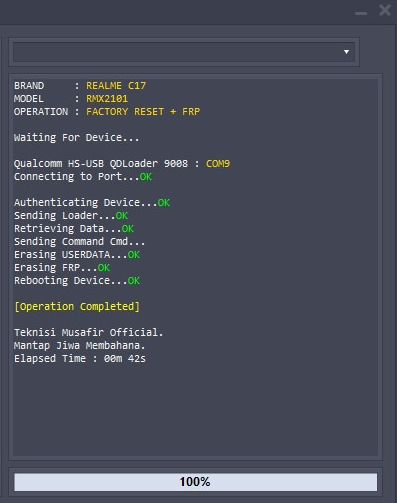
- Connect your Qualcomm Android device to the computer, preferably in EDL mode.
- Open the tool, select the required function (such as FRP erase, factory reset, or EFS wipe), and start the process, then wait until the operation is completed successfully.
Part 5: Pros and Cons of TMT Qualcomm Tool V2.0
Advantages:
- Wide Qualcomm support - Works across most Qualcomm chipsets, including newer Snapdragon models released in 2025–2026.
- IMEI repair options - Provides advanced IMEI repair and modification functions, useful for technicians handling network-related issues.
- Flashing & unlocking - Supports firmware flashing, FRP bypass, and bootloader unlocking for multiple brands. (How to unlock bootloader on Xiaomi?)
- Updated drivers - Compatible with Windows 10/11, ensuring smoother installation and fewer driver conflicts.
- Improved stability - Faster performance and reduced crash rates compared to older versions.
- User interface upgrade - Cleaner UI design makes navigation easier for experienced users.
Disadvantages:
- Technical complexity - Requires knowledge of Qualcomm EDL mode and flashing procedures; not beginner-friendly.
- Risk of misuse - Incorrect IMEI repair or flashing can brick devices or cause legal issues.
- Limited free access - Some advanced features may require paid activation or subscription.
- Device-specific limitations - While broad, support may not cover every Qualcomm phone model, especially region-specific variants.
- Legal concerns - IMEI repair and FRP bypass can be restricted or illegal in certain jurisdictions.
- No macOS support - Works only on Windows, limiting flexibility for technicians using other systems.
Part 6: A Better TMT Qualcomm Tool V2.0 Alternative [Widely Compatible]
A versatile unlocking utility - Android Lock Wiper exists that can handle multiple Android lock types, including PINs, patterns, passwords, fingerprints, and face ID. This program also bypasses Google FRP and account verification, making it a strong alternative to TMT Qualcomm Tool V2.0 for technicians and lawful owners.
With support for thousands of devices and newer Android versions, it provides a reliable solution for secure access restoration.
Core Functions of Android Lock Wiper:
- Efficient FRP Bypass: Skips Google account verification on Samsung, OPPO, realme, Xiaomi, Redmi, OnePlus, etc.
- Screen Lock Removal: Removes PIN, pattern, password, fingerprint, and face ID.
- Samsung Unlock: Unlocks Samsung devices without data loss.
- Fast Reset: Factory resets phones and tablets in 5 minutes.
- Wide Support: Works with 8,000+ devices, including Android 16.0.
- Multi-Lock Handling: Unlocks forgotten passwords and second-hand devices.
- Easy Interface: Simple steps with just a USB cable.
Free Download:

How to use the best TMT Qualcomm Tool alternative?
01: Install and Launch Software
- Download and install the Android phone unlocking software.
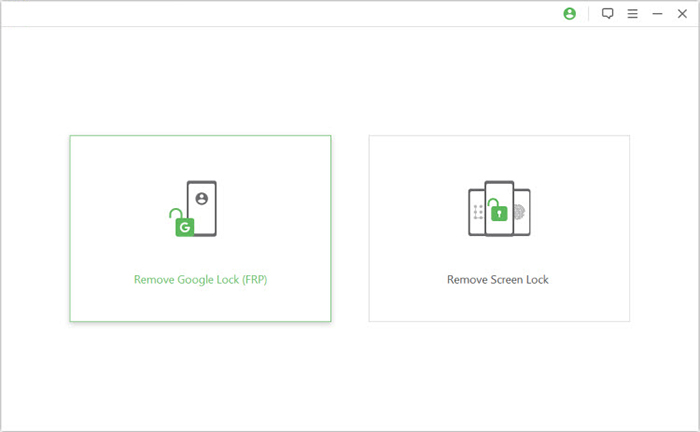
- Open the program and select Remove Google Lock (FRP).
- Choose Advanced Mode to proceed.
02: Connect and Configure Device
- Use a USB cable to connect your Android device.
- Click Start to begin the process.
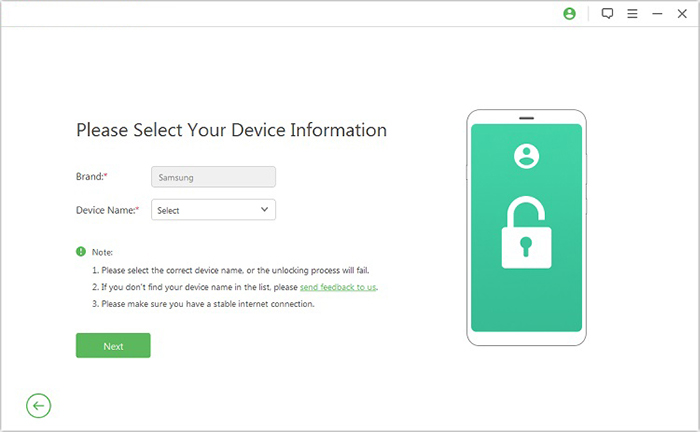
- Enter your device information when prompted and click Next.
- Follow on-screen instructions to boot into recovery mode.
- Select the correct PDA, country, and carrier, then click Download to get the data package.
03: Extract and Finalize Unlock
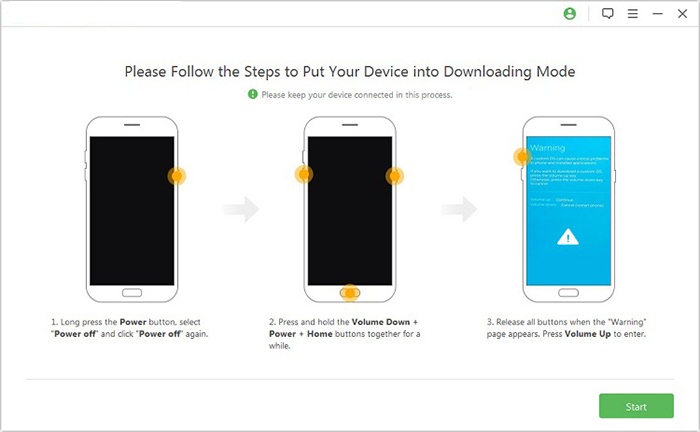
- Click Start to Extract and put your device into Download Mode.
- Enable USB debugging and activate OEM unlock.
- Extract the firmware and follow prompts until the FRP removal is complete.
FAQs about TMT Qualcomm Tool V2.0
Q1. Is TMT Qualcomm Tool V2.0 free?
The tool is generally offered as a free utility, but some advanced features may require activation or a paid license. Always check the official source to avoid modified or unsafe versions.
Q2. Can TMT Qualcomm Tool remove FRP without EDL mode?
Most FRP bypass operations on Qualcomm devices require entering EDL mode. Without EDL, the tool's success rate is limited, so it's not guaranteed to work.
Q3. Is it compatible with Android 16?
Yes, the latest version is designed to support newer Android builds, including Android 16. However, compatibility may vary depending on the specific device model and firmware.
Q4. Why can't my phone enter EDL mode?
This usually happens if the device's bootloader is locked or the correct drivers aren't installed. Using the proper USB cable and Qualcomm drivers often resolves the issue.
Q5. Can TMT Qualcomm Tool flash stock firmware?
Yes, it supports flashing stock firmware on Qualcomm-based devices. This is one of its core functions, useful for restoring bricked or unstable phones.
Q6. Is TMT Qualcomm Tool V2.0 safe to download?
It is safe if downloaded from the official source. Avoid third-party sites, as modified versions may contain malware or unstable builds.
Q7. What should I do if FRP removal fails?
Retry by ensuring the phone is properly in EDL mode and drivers are installed. If it still fails, consider alternative tools like UMT or Hydra Tool, which also support Qualcomm FRP bypass.
In a Nutshell
TMT Qualcomm Tool V2.0 remains a sought-after utility for Qualcomm device servicing, yet its compatibility is not universal. In practice, it only works with part of OPPO and realme phones, leaving certain models unsupported or requiring alternative solutions. This limitation means technicians often pair it with other tools to ensure broader coverage across different Android devices.
Prior to using TMT Qualcomm Tool V2.0 on OPPO or realme phones, always verify the specific model's chipset support list - this simple check prevents wasted effort and reduces the risk of failed flashing or FRP bypass.
Related Articles:
How to Unlock realme Phone with/without Losing Data? 6 Methods Included
How to Back Up & Restore OPPO Reno/Find/R/K/A/F in 6 Trusted Ways?
5 Tactics to Recover Formatted Data from Android Phone with/without Backup
How to Transfer Data from OPPO to OPPO? 5 Easy Ways You Should Never Miss
