
Scrcpy Review: Is It a Qualified Tool? [Impartial Review]
This post begins by examining the overall performance of scrcpy, highlighting its responsiveness, stability, and efficiency across different platforms. Following that, we provide a comprehensive Scrcpy review, covering its usability, control options, and real-world experience. By the end, you will gain a clear understanding of what makes scrcpy a popular choice for Android screen mirroring.
|
Performance Aspect
|
Details
|
|
Responsiveness |
Highly stable for both short and long mirroring sessions when connected via USB; wireless stability depends on network quality. |
|
Resource Usage |
Lightweight and efficient, using minimal CPU and memory on the host computer. |
|
Reliability |
Consistent performance for mirroring, controlling, and recording; occasional limitations with DRM-protected apps. |
|
Flexibility |
Supports both USB and Wi-Fi connections; multiple device support enhances productivity. |
|
User Control |
Full device control via keyboard, mouse, and optional gamepad for various use cases. |
|
Overall Rating |
Considered relatively fast and reliable for tech-savvy users who prefer lightweight, open-source solutions. |
Part 1: Scrcpy: Key Characteristics
Scrcpy is a free, open-source tool that allows you to mirror and control an Android device from a computer. It works by using ADB to stream the screen in real time, enabling interaction through a keyboard and mouse without installing any app on the phone. Known for its low latency and efficient performance, it is commonly used for gaming, development, and screen recording.
|
Feature Category
|
Description
|
|
Screen Mirroring |
Mirrors Android screen to PC in real time with high resolution (up to 1080p or higher). |
|
Screen Recording |
Supports recording of mirrored screen sessions directly on the computer. |
|
Audio Forwarding |
Enables audio transmission (supported on newer Android versions like Android 11+). |
|
File Transfer |
Allows file sharing between Android device and PC (e.g., drag-and-drop or push files). |
|
Multiple Device Support |
Can mirror and control multiple Android devices simultaneously. |
|
Wireless Connectivity |
Supports mirroring over Wi-Fi after initial setup via ADB. |
|
Virtual Display Feature |
Creates secondary virtual displays for advanced use cases (newer versions). |
|
Display Options |
Includes modes like screen-off mirroring, read-only mode, and showing touches. |
|
Cross-Platform Compatibility |
Works on Windows, macOS, and Linux systems. |
Part 2: Scrcpy: Ratings & User Reviews
Scrcpy - Ratings:
Based on SourceForge data, scrcpy holds a very high overall rating of 4.8 out of 5 stars from 16 reviews, with the majority being 5-star ratings and the rest 4-star, showing consistently strong user satisfaction. Category scores such as ease of use, features, design, and support are all rated around 4 out of 5, indicating balanced performance across key aspects.
Scrcpy - Reviews:
User feedback is generally brief but highlights terms like "smooth,""best," and "excellent," reflecting strong appreciation for its performance and functionality. Some reviews note that performance can depend on hardware and connection quality, while a few mention limitations such as black screens in protected apps or audio issues due to copy protection.
Part 3: FAQs about Scrcpy
Q1. Can Scrcpy work wirelessly?
Yes - after enabling ADB over Wi-Fi, scrcpy can mirror your Android screen wirelessly without a USB cable.
Q2. What connection method is better: USB or Wi-Fi?
USB generally provides a more stable and lower-latency connection compared to Wi-Fi, which can be slower or less consistent.
Q3. Can I record my screen with Scrcpy?
Yes - scrcpy includes built-in screen recording functionality, letting you save mirrored sessions to your computer.
Q4. What devices and systems does Scrcpy support?
scrcpy works with Android devices running Android 5.0 or later and supports Windows, macOS, and Linux hosts.
Q5. Why is my Scrcpy screen black?
Some apps with DRM or content protection may show a black screen when mirrored through scrcpy, which is a known limitation of screen mirroring tools.
Q6. Do I need to install any app on my phone for Scrcpy?
No - scrcpy does not require installation of any app on the Android device, as it uses ADB to transmit the screen and control data.
Q7. How do I use Scrcpy?
- Enable Developer Options on your Android device by going to Settings > About phone and tapping Build number seven times.
- Turn on USB Debugging in Settings > Developer Options.
- Connect your Android device to your computer via USB and grant permission for USB debugging when prompted.
- Install scrcpy on your computer and open a terminal or command prompt in its folder.
- Run the command scrcpy to start mirroring and controlling your device.
- For wireless connection, first connect via USB and execute adb tcpip 5555.
- Disconnect USB, then connect over Wi-Fi using adb connect <device IP>.
- Run scrcpy again to mirror your device wirelessly.
Part 4: Scrcpy: Pros and Cons
The table below summarizes the key advantages and limitations of scrcpy, highlighting its performance, flexibility, and usability features. It provides a clear overview of what users can expect when using scrcpy, based on multiple professional reviews.
|
The Good
|
The Bad
|
|
Very low latency and smooth real-time performance, suitable for gameplay and interaction |
No official graphical user interface (command-line based), which can be difficult for non-technical users |
|
Free and open-source with no subscriptions or ads |
Initial setup requires enabling ADB and USB debugging on Android which may confuse beginners |
|
Works across Windows, macOS, and Linux |
Wireless setup (Wi-Fi) can be unstable or tricky compared to USB |
|
High-resolution display and adjustable settings (resolution, bitrate, rotation) |
Audio forwarding support is limited or dependent on Android version |
|
Supports screen recording and screenshot capture |
Some apps with content protection may appear black or fail to display |
|
Allows controlling the phone via keyboard, mouse, and optional gamepad |
Lacks built-in advanced features like remote file browsing or TV casting that some paid tools offer |
|
Does not require any app installation on the phone |
Performance depends on device and computer hardware capabilities |
Tips: 1. Pros are drawn from evaluations of performance, features, and flexibility across the sources. 2. Cons reflect limitations noted in discussions of usability, setup complexity, and feature gaps compared with more beginner-friendly paid alternatives.
Part 5: What Could Be Better than Scrcpy
Offering seamless screen mirroring for both Android and iOS devices to PC or Mac, Screen Mirror delivers high-quality, low-latency streaming with full keyboard and mouse control. Its intuitive interface and broad device support make it a practical alternative to scrcpy for those who prefer a graphical setup over command-line configuration.
After mirroring your smartphone screen to a computer in real time, it lets you stream videos, games, and apps smoothly with minimal lag while also offering screen recording and screenshot capture directly on the PC. With flexible display settings and route simulation features, users can adjust resolution, orientation, and even pause or resume movements for a more tailored experience.


How to use the best Scrcpy replacement (Take Android phone/tablet as an example)?
- Start by downloading and installing Screen Mirror on your computer.
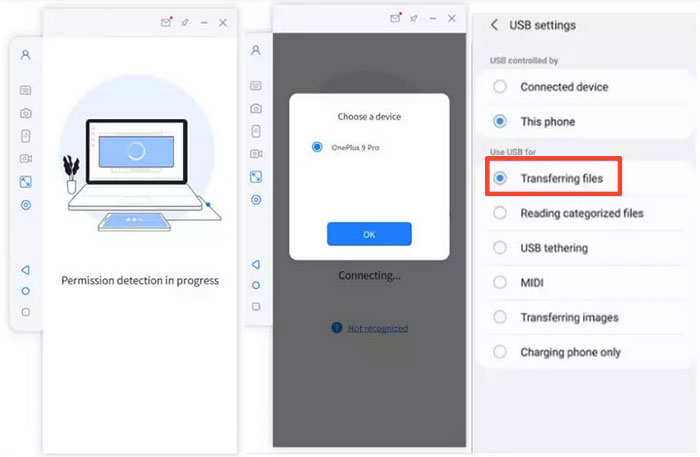
- After installation, connect your Android device via USB, select your phone when prompted, and choose the "Transfer files" option.
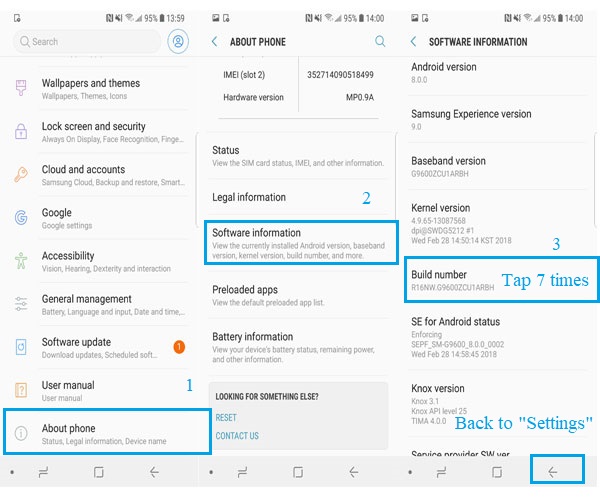
- On your phone, go to Settings > About phone > Software information, then tap Build number seven times to enable Developer options.
- Return to Settings and turn on USB debugging while your device remains connected.
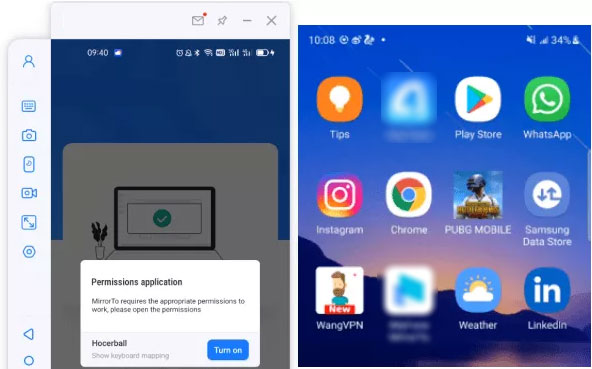
- Allow the app to access your device to display its content, then click "Turn on" to install the Screen Mirror APK.
- Once connected, you can easily mirror and control your Android data from your Windows or macOS computer.
Why Power Users Prefer Screen Mirror over Scrcpy
The table below highlights the key differences between Screen Mirror and scrcpy, showing why some power users prefer one tool over the other. It compares usability, features, and device support to provide a clear perspective for choosing the right screen mirroring solution.
|
Comparison Aspect
|
Screen Mirror
|
Scrcpy
|
|
Setup Speed
|
Quick setup with minimal technical steps |
Requires enabling ADB and USB debugging manually |
|
Audio Support
|
Built-in audio streaming with mirrored display |
Limited native audio support (device/version dependent) |
|
Multi-Device Flexibility
|
Works seamlessly with both Android and iOS |
Only supports Android devices |
|
Control Method
|
Direct control via mouse and keyboard with visual UI |
Full control, but users must understand commands |
|
Recording & Capture
|
Integrated screen recording and screenshot tools |
Supports recording via command options |
|
Display Customization
|
Flexible settings through UI (resolution, orientation) |
Customizable, but requires command flags |
|
Wireless Connection
|
Easy wireless setup through UI |
Wireless setup requires manual ADB commands |
|
Extra Features
|
Route simulation with pause/resume |
Focused on core mirroring and control |
|
Best for
|
Users who want simplicity, visual tools, and all-in-one features |
Tech-oriented users who prefer lightweight, open-source solutions |
Best Scrcpy alternative free download:
Related Articles:
5 Popular Ways to Mirror iPhone/iPad to Windows 11/10 [2026 Latest]
How to Recover Data from Phone That Won't Turn on? Solved with 4 Solutions
PC/Computer Doesn't Recognize Android Phone? 10 Optimal Solutions
8 Best Android Sync Managers for Easy Data Sync & Management
