
4 Most Admirable Redmi Sync Software That Merit Attention
TL;DR:
Smartphones now hold both personal and professional data, making reliable backup and sync solutions essential for Redmi users. MobiKin Backup Manager for Android offers a practical way to back up and restore contacts, messages, photos, videos, and more between Redmi phones and a computer. It supports selective backups and stable transfers, making it a reliable choice for users who prefer clear control over their data management.
With smartphones becoming central to daily life, managing personal and professional data on a Redmi device has become more important than ever. Many users look for practical ways to sync files between a Redmi phone and a computer or cloud storage for easier access and storage, especially when handling photos, documents, and work materials. This page empowers you to pick suitable Redmi sync software for backup or digital organization.
Take a look below to understand the topic in a visual way.
#1: Best Redmi Sync Software - MobiKin Android Backup & Restore
For users who prefer managing phone data through a computer, MobiKin Backup Manager for Android (Windows/Mac) offers a practical way to handle Redmi backups and transfers. Termed MobiKin Android Backup & Restore, this program focuses mainly on creating local backups and restoring selected files when needed.
Instead of running in the background, it requires manual operation each time you want to update your data. As a result, it works well for controlled backups but is less suitable for continuous syncing.
MobiKin Android Backup & Restore - Main Features:
- Full Data Backup & Restore - Save and restore contacts, messages, photos, videos, apps, and more.
- Selective Backup - Choose specific data types instead of backing up the entire device.
- Fast & Stable Transfers - Quick syncing between Redmi devices and PC without data loss.
- Cross-Device Compatibility - Supports all major Redmi phones, including Note, K, and Redmi series.
- Secure & Reliable - Keeps your data safe during backup and restore processes.


How-to Guide:
- Install the program on your computer, launch it, and connect your Android phone via USB or Wi-Fi with USB debugging enabled.
- After the device is detected, select "Backup" and choose the file types you want to save.
- Set a storage location, then click "Back Up" to start the process.
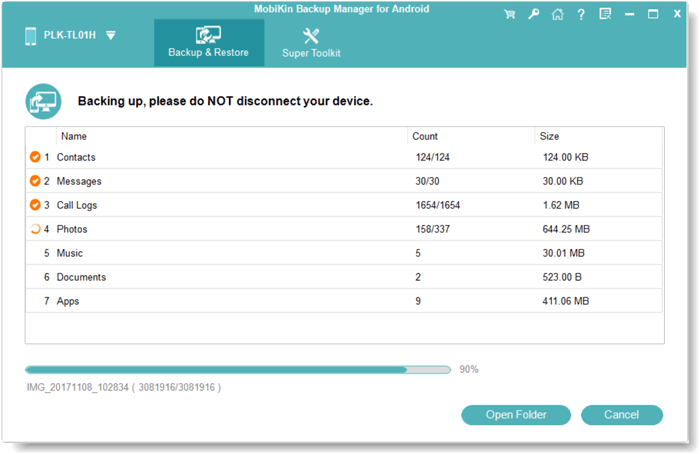
Video Tutorial:
Prerequistes:
- A Windows or macOS computer.
- Installed desktop software.
- USB cable.
- USB debugging enabled on the Redmi phone.
Considerations:
- Works mainly as a manual backup and restore tool.
- Focuses on local computer backups rather than cloud syncing.
- Best suited for users who prefer offline data backup/management.
Strengths:
- Supports many data types, including contacts, messages, photos, videos, music, apps, etc.
- Allows selective backup and restore.
- Compatible with 8,000+ Android brands, including Redmi Note Series (Note 15/14/13/12 and variants), Redmi Series (15/15C/14/13/12/11 models), Redmi K Series, Redmi A Series, and Redmi Turbo Series.
- Simple interface and easy operation.
- Stable performance for local backups.
Limitations:
- Full features require a paid license.
- No automatic or scheduled backups.
- Does not integrate with cloud services.
You Might Also Like: 5 Best Redmi Data Eraser Software [Option 1 Is the Most Desirable]
#2: Mi PC Suite
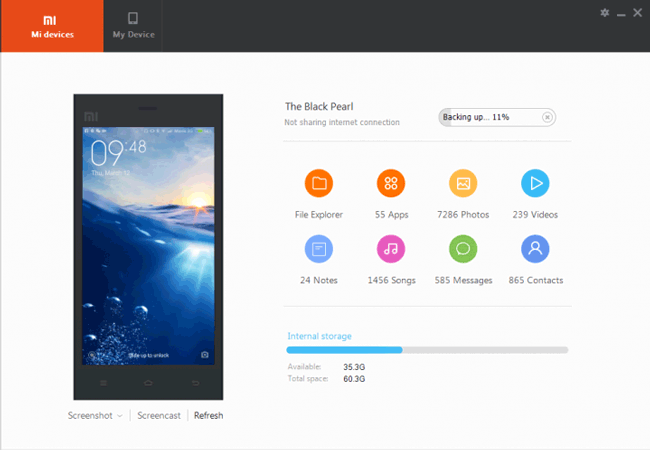
On Windows computers, many Redmi users have previously relied on Mi PC Suite to organize and back up their devices. This official tool allows basic management of contacts, messages, media files, and apps through a wired connection.
Its design reflects an earlier stage of Xiaomi's software ecosystem, which makes it less compatible with newer models. While it can still function as a simple sync solution for older phones, its limited updates reduce its reliability today.
Prerequistes:
- Windows computer.
- USB cable.
- Compatible Redmi model.
- USB debugging enabled.
Considerations:
- Official Xiaomi desktop tool.
- Mainly designed for older MIUI-based devices.
- Limited support for newer Redmi models.
Strengths:
- Free to use.
- Provides basic backup and restore functions.
- Supports file management and media transfer.
- Works without an internet connection.
Limitations:
- Not actively maintained.
- Often incompatible with new Redmi phones.
- No macOS support.
- No cloud or automatic sync.
- Detection and stability issues on modern systems.
Click to Learn: Mi PC Suite Reviews, How-tos, Download & 3 Best Alternatives
#3: Xiaomi HyperConnect
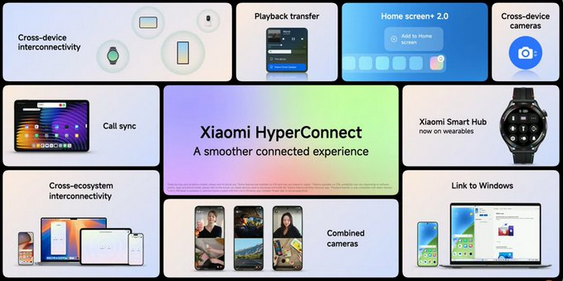
Within Xiaomi's own ecosystem, Xiaomi HyperConnect focuses more on device interaction than traditional data backup. It enables wireless file sharing, clipboard syncing, and cross-device notifications between supported devices. Rather than storing copies of your data, it emphasizes real-time access and convenience. This makes it useful for daily transfers, but not ideal for long-term backup or full data synchronization.
Prerequistes:
- Redmi phone running HyperOS.
- Compatible Xiaomi ecosystem devices.
- The same Wi-Fi network or Bluetooth enabled.
- Xiaomi account for some features.
Considerations:
- Designed for device connectivity, not full backup.
- Works best within the Xiaomi ecosystem.
- Focuses on sharing and continuity rather than storage.
Strengths:
- Supports fast file sharing between devices.
- Enables cross-device clipboard and notifications.
- Allows screen and app collaboration.
- Works wirelessly without cables.
- Integrated into the system.
Limitations:
- Not a true backup or sync manager.
- Limited usefulness outside Xiaomi devices.
- Feature availability depends on device model.
- Does not support full data archiving.
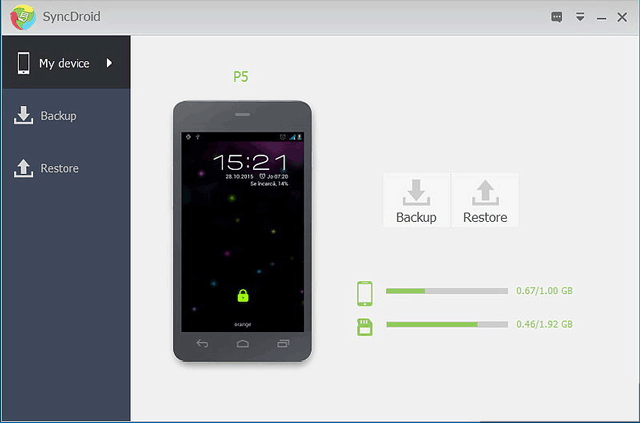
#4: SyncDroid
As a lightweight third-party solution, SyncDroid provides basic tools for backing up and transferring Redmi data to a computer. It supports contacts, messages, call logs, and media through USB or wireless connections. Most tasks must be started manually, which gives users control but requires extra effort. For simple syncing needs, it can be helpful, although its features are limited compared with more modern tools.
Prerequistes:
- Desktop client installed on PC or Mac.
- Android app installed on phone.
- USB cable or Wi-Fi connection.
- USB debugging enabled.
Considerations:
- Basic backup and transfer utility.
- Development and updates are limited.
- Suitable for simple backup needs.
Strengths:
- Free to use.
- Supports contacts, SMS, call logs, media, and bookmarks.
- Offers USB and wireless connection options.
- Works with many Android brands.
Limitations:
- Limited advanced features.
- Occasional performance and compatibility issues.
- No scheduled syncing.
- Interface feels outdated.
- Manual operation required.
In Conclusion
Looking back at the powerful tools discussed in this article, it is clear that each option serves a specific purpose, whether for backup, transfer, or daily management. Some focus on wireless sharing, while others emphasize local storage and manual control.
Among these choices, MobiKin Backup Manager for Android offers a balanced approach by combining stable performance with flexible backup and restore features. For users who value reliability and clear data management, it remains the most practical solution for Redmi data sync.
Related Articles:
How to Transfer Data from Old Phone to Redmi? 4 Practical Ways
4 Practical Techniques to Export Redmi Contacts to Excel [2026]
7 Hassle-free Methods to Recover Deleted Photos in Redmi/Mi Phone
