
4 Workable Approaches to Recover Deleted Photos from TECNO
Accidentally deleting pictures from a TECNO phone can be upsetting, as images often hold personal memories or work-related content. Fortunately, there are ways to restore these lost files. Recovery allows users to maintain backups or move important files to safer storage for future use, reducing the risk of permanent loss.
This guide explores 4 clever strategies to recover deleted photos from TECNO, helping you retrieve your pictures whether they were removed from the gallery, SD card, or cloud backup.

- Way 1: Recover Deleted Photos from TECNO without Backup [Trusted]
- Way 2: Recover Deleted Pictures on TECNO Phone via File Manager Trash
- Way 3: Retrieve Permanently Deleted Photos from TECNO SD Card
- Way 4: Recover Permanently Deleted Pics from TECNO via OneDrive Backup
- FAQs about Recovering Deleted Photos from TECNO
Way 1: Recover Deleted Photos from TECNO without Backup [Trusted]
Accidental photo deletion on a TECNO device does not always mean permanent loss when MobiKin Doctor for Android (Windows/Mac) is available. The software scans the phone's internal storage and locates deleted image files that are still recoverable. It allows users to preview pictures before selecting the ones they want to restore. The recovered photos can then be saved safely to a computer without overwriting existing data on the phone.
MobiKin Doctor for Android - Main Features:
- Scans TECNO storage to find deleted photos.
- Recovers photos without backup.
- Previews images before recovery.
- Restores photos safely to a computer.
- Supports common image formats (JPG, PNG, GIF, etc.).
- Two recovery modes: internal memory or SD card.
- Compatible with TECNO and most Android devices, including TECNO Pova 7 5G, Pova Curve 5G, Spark 40 5G, Spark 40 Pro+, and Camon 50 Pro.
- Simple process: connect, scan, and recover.
Retrieve Deleted Images from TECNO Using MobiKin Doctor for Android:
- Start by opening the installed application and connecting your TECNO device to your PC via a USB cable.
- Make sure that USB debugging is activated on your TECNO device as instructed, which will permit the program to access the device.
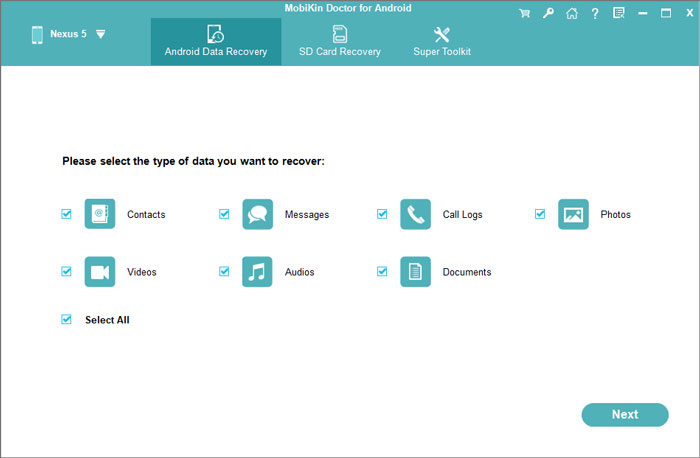
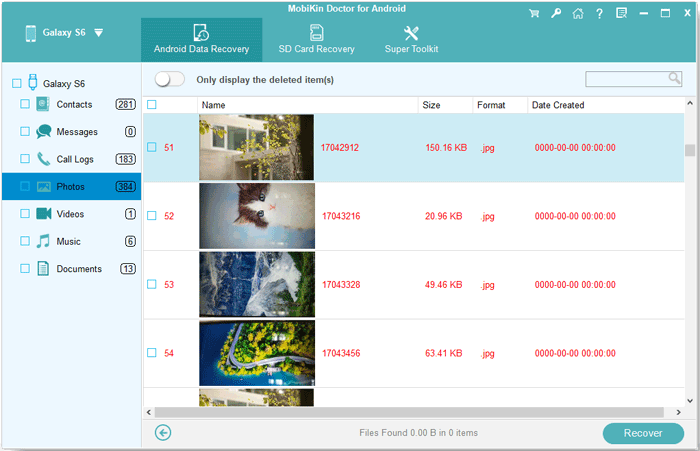
- After that, choose the "Photos" category and press the "Next" button. The software will commence a scan of your TECNO, identifying all lost images and displaying them in the next window.
- If you cannot locate the desired files from the scanned results, consider rooting your phone for a more comprehensive scan.
- Identify the image files you wish to retrieve and click the "Recover" button to save them to your computer. Please do not disconnect the connection until the recovery process is complete.


Video Guide:
You May Also Like: 5 Desirable Ways to Recover Photos after Factory Reset on Android Phone
Way 2: Recover Deleted Pictures on TECNO Phone via File Manager Trash
Many TECNO phones temporarily keep removed files in a system recycle folder called File Manager Trash. This folder stores recently deleted pictures for a limited time before they disappear permanently. Users can browse the trash list and choose the photos they want to bring back. After restoration, the images usually return to their original location such as the DCIM or Pictures folder.
Restore Deleted Photos from TECNO Using File Manager Trash:
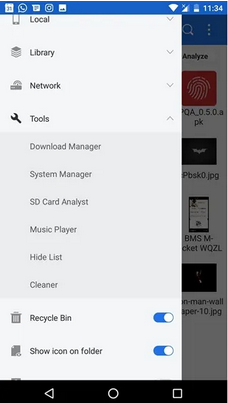
- Open the File Manager app on your TECNO phone.
- Tap the menu icon (three lines or three dots).
- Select Trash, Recycle Bin, or Recently Deleted.
- Browse the deleted files and locate the photos you want to recover.
- Long-press the photo(s) to select them.
- Tap Restore or Recover.
- The pictures will return to their original folder (such as the DCIM/Camera or Pictures folder).
- Open the Gallery app to confirm the recovered photos are restored successfully.
Way 3: Retrieve Permanently Deleted Photos from TECNO SD Card
Extra storage provided by an SD Card can also serve as a source for photo recovery on TECNO devices. When pictures stored on the card are deleted, the file entries often remain until new data overwrites them. Data recovery programs on a computer can scan the memory card and detect these remaining traces. Selected photos can then be recovered and saved to a secure location on the computer.
Recover Deleted Pictures from TECNO Using SD Card:
- Remove the SD card from your TECNO phone and insert it into a computer using a card reader.
- Download and install an SD card data recovery tool on the computer.
- Launch the recovery program and select the SD card under "Removable Devices."
- Choose the file type "Photos" or "Images."
- Start scanning the SD card using Quick Scan or Deep Scan to search for deleted pictures.
- Wait for the program to analyze the SD card and detect recoverable image files.
- Preview the scanned results and select the photos you want to restore.
- Click Recover and save the photos to a different location on the computer, not the SD card, to avoid overwriting data.
Way 4: Recover Permanently Deleted Pics from TECNO via OneDrive Backup
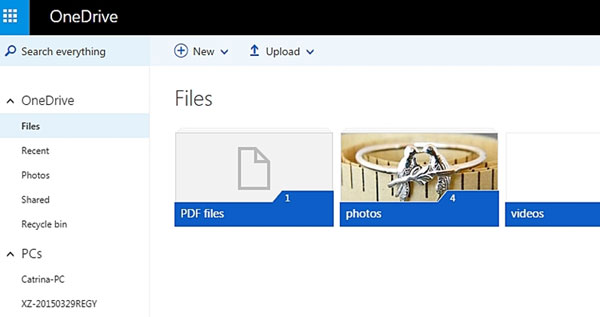
Cloud backups often provide another opportunity to retrieve missing images, and OneDrive Backup is one example TECNO users may rely on. Photos synchronized with the Microsoft account remain stored in the cloud even after removal from the phone. The backup library allows users to browse previously uploaded pictures and download them again. Once restored, the images can reappear in the phone gallery after being saved back to the device.
Recover Lost Photos from TECNO Using OneDrive:
- Open the OneDrive app on your TECNO phone and sign in to the Microsoft account used for photo backup.
- Tap Photos on the bottom navigation bar to view all images backed up to OneDrive. (What if OneDrive doesn't sync?)
- Browse the cloud library and locate the photos you want to recover.
- Select the pictures by tapping and holding them.
- Tap the three-dot menu (More options) in the upper-right corner.
- Choose Save or Save to device.
- Wait while OneDrive downloads the selected photos back to the phone.
- Open the Gallery app on your TECNO phone to confirm the pictures have been restored.
FAQs about Recovering Deleted Photos from TECNO
Q1. How long do deleted photos stay in the TECNO Trash folder?
Typically, photos remain in the Trash/Recently Deleted folder for about 30 days before permanent deletion.
Q2. What should I do immediately after deleting photos?
Stop using the phone to avoid overwriting deleted files, increasing the chance of successful recovery.
Q3. Can I recover photos deleted from WhatsApp or other apps on TECNO?
Yes, if the app data is backed up or stored on an SD card or cloud service, recovery tools like MobiKin Doctor for Android can help retrieve them.
Q4. Why are some deleted photos not recoverable?
Photos may become unrecoverable if they are overwritten by new data or if too much time has passed since deletion.
Q5. What is the most productive way to recover deleted photos from TECNO?
The most effective way to recover deleted photos from a TECNO phone is by using MobiKin Doctor for Android, especially when no backup is available. It can deeply scan the phone's internal storage and SD card to locate deleted images that other methods cannot access.
Users can preview and selectively restore photos, ensuring only the needed files are recovered. This makes it the most reliable choice for fully retrieving lost pictures safely and efficiently.
Related Articles:
5 Tested Strategies to Transfer Data from TECNO to TECNO
4 Easy Solutions to TECNO FRP Bypass [Technical Expertise]
