TouchCopy Review - A Comprehensive Assessment Based on Our Tests
TL;DR:
TouchCopy is easy to use and covers most iOS data types, but its value is undermined by vague lifetime policies, desktop-only availability, and inconsistent support. For users seeking better long-term value or cross-platform flexibility, MobiKin Assistant for iOS is worth exploring.
This TouchCopy review begins with a multi-factor evaluation table that provides a quick snapshot of its strengths and weaknesses across key areas. In the detailed discussion that follows, we will examine each factor - from overview and pricing to support quality and security - to help you decide whether TouchCopy suits your needs.
|
Factor
|
Rating
|
Detailed Comments
|
|
Feature Completeness
|
3 Stars |
Supports music, photos, messages, contacts, etc.; exports to PDF/CSV/vCard/iCal; imports to iTunes with metadata. Cannot transfer PC files to iOS. |
|
Pricing & Value
|
3 Stars |
Plans: 6-mo ($28.50), 12-mo ($40), Lifetime ($70). Lifetime may not cover future updates (some users report re-purchase issues). Trial limits to 100 copies. |
|
Customer Support
|
3.5 Stars |
Trustpilot 3.8/5; mixed reviews - some praise quick help, others find support hard to reach and chatbot unhelpful. |
|
Update Frequency
|
3 Stars |
Active updates (recent versions in 2026), but some updates are treated as new products rather than free upgrades. |
|
Security & Safety
|
4 Stars |
Virus-free, digitally signed; data stored locally. Safe when downloaded from official site. |
|
User Reputation
|
3.5 Stars |
Polarised - positive for solving iTunes gaps; negative for misleading "Lifetime" terms, incomplete transfers, and crashes. |
Section 1: What Is TouchCopy
TouchCopy is a software tool for backing up and managing content from iPhone, iPad, and iPod on a Windows PC or Mac. It can save messages, including SMS, MMS, iMessage, WhatsApp, and LINE conversations, in formats such as PDF, CSV, HTML, or text, while also supporting the backup of contacts, call history, notes, calendars, photos, and videos.
In addition, TouchCopy can transfer music, playlists, podcasts, and videos to a computer, iTunes, or Apple Music while preserving related track information.
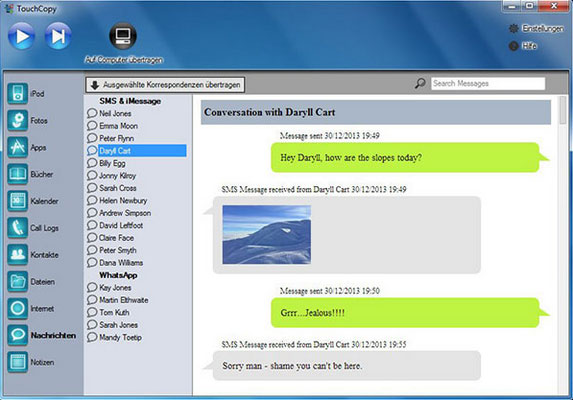
Our Take: TouchCopy is an all-in-one iOS management tool that not only backs up and exports a wide range of data but also transfers music, playlists, podcasts, and videos to your computer or iTunes while keeping all track information intact.
Section 2: Is TouchCopy Safe to Use
Yes. Based on the developer's security information and available third-party evidence, TouchCopy appears generally safe to use when downloaded from an official or reputable source. One caveat is that a valid digital signature alone does not prove software is malware-free, so it is better to consider it alongside antivirus scans, download-source security, privacy practices, and user feedback.
|
Aspect
|
Assessment
|
|
Malware |
No viruses, adware, or spyware reported; installer has been scanned by antivirus services. |
|
Data Privacy |
User data is stored locally and not sent to the developer. |
|
Digital Signatures |
Windows and Mac versions are digitally signed and verified. |
|
Third-Party Testing |
Checked by VirusTotal, Norton Safe Web, Google Safe Browsing, and others. |
|
Developer Background |
Developed by Wide Angle Software, an established software company. |
|
User Reviews |
Generally positive, though some users report technical issues. |
|
Download Security |
Safe when downloaded from the official website; avoid cracked or modified versions. |
Our Take: Safety can vary if you obtain TouchCopy from unofficial download sites or modified/cracked packages. For the lowest risk, use the official TouchCopy download page and keep your antivirus software enabled.
You Might Also Enjoy: 6 Best File Managers for Android to Keep Data Well-organized 2026
Section 3: TouchCopy - Pricing Plans
TouchCopy offers several licensing options to suit users who need short-term or long-term access. The plans differ in price, license duration, and the number of computers covered. The table below summarizes the main TouchCopy pricing plans for easy comparison.
|
Plan
|
Price
|
Coverage
|
|
6-Month License
|
$28.50 |
1 computer for 6 months |
|
12-Month License
|
$40.00 |
1 computer for 12 months |
|
Lifetime License
|
$70.00 |
2 computers, lifetime access |
Our Take: TouchCopy offers three pricing tiers: a 6-month license for $28.50 (1 PC), a 12-month license for $40.00 (1 PC), and a lifetime license for $70.00 (2 PCs), catering to both short-term and long-term needs.
Section 4: TouchCopy - Benefits & Drawbacks
TouchCopy - Benefits
- Supports a wide range of iPhone, iPad, and iPod data, including messages, photos, music, contacts, and call logs.
- Allows data transfer via USB or Wi-Fi.
- Exports content to common formats such as PDF, CSV, vCard, iCal, and MP4.
- Uses one-time pricing instead of a recurring subscription.
- Offers a straightforward interface for browsing and transferring device content.
TouchCopy - Drawbacks
- The free trial has limited functionality.
- Windows and Mac desktop versions are available, but there is no mobile or browser version.
- Android support is limited compared with iOS.
- Windows users may occasionally encounter iTunes issues.
- The lifetime license covers only two computers, which may be restrictive for teams or larger households.
Our Take: While TouchCopy offers broad data support, flexible USB/WiFi transfer, multiple export formats, one-time pricing, and an intuitive interface, it is held back by a limited trial, desktop-only availability, weak Android support, occasional Windows driver issues, and a lifetime license that caps at just two computers.
Section 5: Best Replacement for TouchCopy
MobiKin Assistant for iOS (Windows/Mac) is a desktop tool that lets you transfer, back up, and manage photos, music, contacts, messages, notes, videos, and other iOS data on a computer. It supports selective and batch transfers, data preview, and direct management of files without relying on TouchCopy or iTunes synchronization.
As a result, it can serve as a practical TouchCopy alternative for users who want to manage iPhone, iPad, or iPod data directly from a Windows PC or Mac.
Key Characteristics of MobiKin Assistant for iOS:
|
Feature
|
Description
|
|
Data Transfer |
Transfers photos, music, contacts, messages, notes, calendars, bookmarks, videos, and other data between iPhone/iPad/iPod and a computer. |
|
Backup & Restore |
Backs up iOS data to a computer and selectively restores data from iTunes backups. |
|
Data Management |
Lets users view, add, edit, delete, and organize contacts, photos, messages, notes, calendars, and bookmarks from a computer. |
|
Contact Export |
Exports iPhone contacts in formats such as CSV, VCF, and XML. |
|
App Management |
Allows unwanted iOS apps to be uninstalled directly from a computer. |
|
Batch Transfer |
Supports selective and batch transfer of multiple types of iOS data. |
|
TouchCopy Alternative |
Its combination of iOS data transfer, computer backup, message/contact export, media management, and local data handling makes it a good alternative to TouchCopy for users who mainly need to manage and back up iPhone/iPad content on a computer. |
Free & Safe Download:


With just one tap, you can transfer files, making it a great choice for quickly accessing important iPhone/iPad data on your PC when time is limited. Now, let's see how to use the best TouchCopy substitute for Windows/Mac - MobiKin Assistant for iOS - to browse and manage your iOS data on your PC:
Connect your Apple device to the computer via a USB cable and launch MobiKin Assistant for iOS. The program will automatically detect your device, and its main interface will be displayed as shown below.
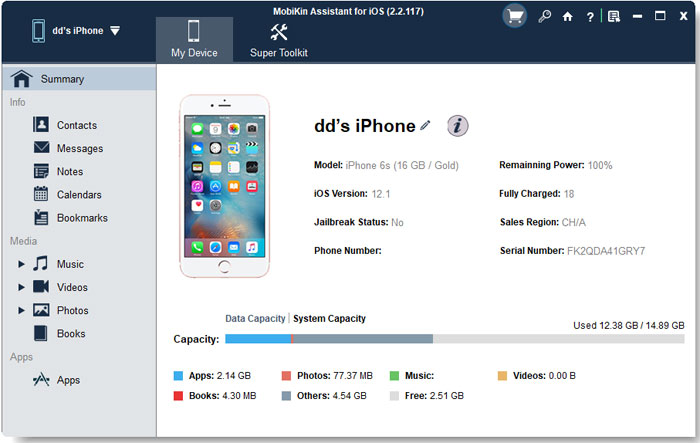
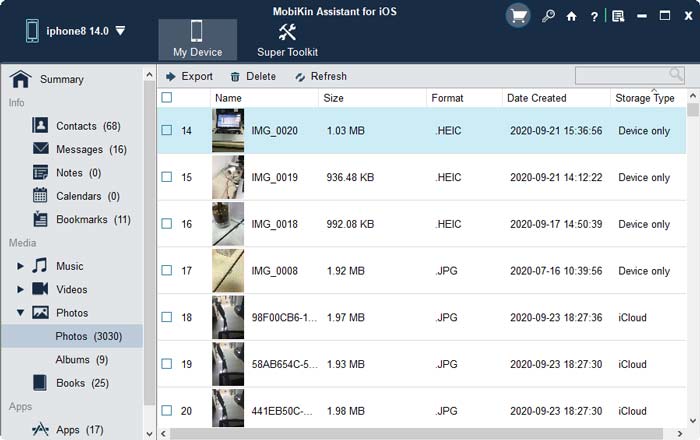
On the main screen, all file types accessible on your iPhone appear in the left sidebar, including "Contacts", "Messages", "Notes", "Calendars", "Bookmarks", "Music", "Videos", "Photos", "Books", and "Apps". Simply click on any category to browse and manage the corresponding files on your PC.
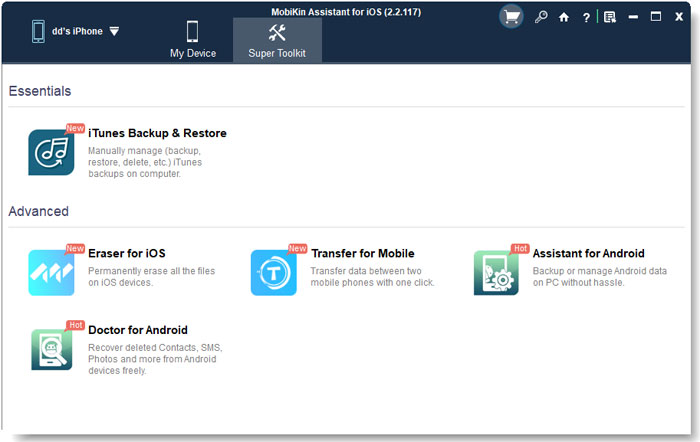
Go to the "Super Toolkit" option at the top of the screen. Then go for iTunes Backup & Restore and follow the on-screen prompt to back up or restore your iDevice data without iTunes.
Video Guide:
Our Take: MobiKin Assistant for iOS is a full-featured desktop alternative to TouchCopy that lets you transfer, back up, restore, and directly manage a wide range of iOS data via a simple USB connection, with an intuitive sidebar for data management and a "Super Toolkit" for iTunes-free backup/restore, all while supporting selective and batch operations.
FAQs about TouchCopy
Q1: Can TouchCopy transfer music from an iPod to a computer?
Yes. It can transfer music and playlists from an iPod to a computer while retaining playlist and track information.
Q2: Does TouchCopy work without iCloud or iTunes?
Yes. TouchCopy can transfer Apple-device data directly to a computer without relying on iCloud or iTunes.
Q3: Does TouchCopy support Wi-Fi transfers?
Yes. Besides USB connections, TouchCopy supports transferring data over Wi-Fi.
Q4: Does TouchCopy support Android devices?
Its Android support is limited, so it is primarily suited to users managing Apple devices.
Q5: Is TouchCopy worth using?
It can be a useful choice for transferring iPhone or iPod data to a computer, especially for users who want broad data-type support and one-time pricing rather than a subscription.
Q6: Can TouchCopy export iPhone data in different formats?
Yes. Depending on the data type, TouchCopy supports formats such as PDF, HTML, CSV, vCard, and text.
Related Articles:
iPhone Touch Screen Not Working/Responding? 10 Troubleshooting Tips
9 Best PhoneCopy Alternatives in 2026 [Few People Know]