
Unbiased EaseUS MobiUnlock for Android Review & Best Alternative
For many Android users who face lock screen or FRP issues, choosing the right unlocking tool requires careful consideration. This EaseUS MobiUnlock for Android review focuses on practical aspects such as key features, ease of use, user experience, pricing, security, and overall reliability.
By examining how the software performs in real situations, readers can better understand whether it meets their needs and expectations before making a decision.
- Section 1: EaseUS MobiUnlock for Android: Core Features
- Section 2: EaseUS MobiUnlock for Android: Price & Security
- Section 3: How to Use EaseUS MobiUnlock for Android
- Section 4: FAQs about EaseUS MobiUnlock for Android
- Section 5: EaseUS MobiUnlock for Android: Likes & Dislikes
- Section 6: EaseUS MobiUnlock for Android: Top Alternative
Section 1: EaseUS MobiUnlock for Android: Core Features
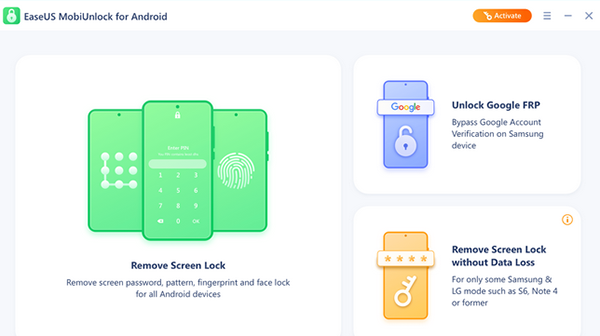
EaseUS MobiUnlock for Android is a desktop-based unlocking tool that helps users remove screen locks and Samsung FRP locks without needing the original password. It supports most major Android brands and provides a simple, guided process for regaining access to locked devices.
Unlocking a locked Android phone can be frustrating, especially when you forget your screen password or encounter a Samsung FRP lock. The following table highlights the core features of EaseUS MobiUnlock for Android, helping you understand how it simplifies the unlocking process.
|
EaseUS MobiUnlock for Android - Key Features
|
Detailed Explanation
|
|
Screen Lock Removal |
Instantly unlock Android lock screens, including PIN, pattern, password, fingerprint, and face recognition, within minutes. |
|
Samsung FRP Bypass |
Easily remove Samsung Factory Reset Protection (FRP) lock without needing the original Google account or password. |
|
Fast Unlock Process |
Uses optimized unlocking technology to complete screen lock and FRP removal quickly and efficiently. |
|
Wide Device Compatibility |
Supports about 90% of Android phones, including major brands like Samsung, Huawei, LG, Xiaomi, and more. |
|
User-Friendly Operation |
Provides a simple interface with step-by-step instructions, making it suitable for both beginners and advanced. |
Section 2: EaseUS MobiUnlock for Android: Price & Security
Before choosing an Android unlocking tool, understanding its cost and safety measures is essential. The following sections outline the pricing plans and security features of EaseUS MobiUnlock for Android to help you make an informed decision.
Pricing Options:
- Yearly subscription costs about US $69.95 and supports multiple Android devices on one PC.
- Lifetime license is priced at around US $89.95 for permanent access and updates.
- A free trial version is available for users to test basic features before purchasing.
- A 30-day money-back guarantee is offered if the software does not meet expectations.
Security and Safety Highlights:
- Uses secure payment systems with encryption to protect purchase information.
- Does not collect, store, or share personal data during the unlocking process.
- Provides official technical support through email and live chat channels.
- Includes a refund policy to reduce financial risk for new users.
Section 3: How to Use EaseUS MobiUnlock for Android
Forgetting your Android lock screen password or getting stuck on an FRP lock can interrupt daily use and cause unnecessary stress. Here are the steps explain how to use EaseUS MobiUnlock for Android to regain access to your device quickly:
- Download and install EaseUS MobiUnlock for Android on your computer, then launch the program.
- Connect your locked Android phone to the computer using a USB cable.
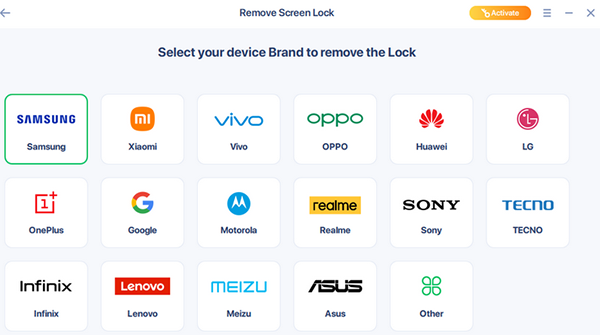
- Select the appropriate unlock mode, such as Remove Screen Lock or Remove Google Lock (FRP).
- Choose your phone brand and model from the list provided in the software.
- Follow the on-screen instructions to confirm device information and prepare for unlocking.
- Click Unlock or Start to begin the unlocking process.
- Wait for the process to finish, then disconnect your phone and set up a new lock if needed.
Section 4: FAQs about EaseUS MobiUnlock for Android
Q1. Will EaseUS MobiUnlock for Android delete my data?
In many cases, removing the screen lock will erase the data on the device. This is done to protect user privacy, so backing up important files in advance is strongly recommended.
Q2. Is there a free version of EaseUS MobiUnlock for Android?
EaseUS provides a free trial that allows users to download the software and preview its features. However, unlocking functions usually require purchasing a license.
Q3. Will it affect warranty or security features?
Using the official software itself usually doesn't void the hardware warranty, but removing certain locks may trigger device security flags; always check your manufacturer's policy before proceeding.
Q4. Is it safe to use EaseUS MobiUnlock Crack?
No, using cracked or pirated versions is unsafe and illegal. These versions often contain malware, spyware, or hidden risks that can damage your device or steal personal information.
Q5. How long does the unlocking process usually take?
The unlocking time varies depending on your device model and lock type, but most screen lock removals are completed within a few minutes once the connection and settings are correct.
Q6. Do I need to enable USB debugging before using it?
For some devices, enabling USB debugging or granting permissions may be necessary to establish a successful connection; instructions are typically provided in the software during setup.
Q7. What should I do if my device isn't recognized?
If your phone isn't detected by the software, try using a different USB cable or port, install the correct device drivers, and ensure the device screen is on and unlocked enough for communication.
Section 5: EaseUS MobiUnlock for Android: Likes & Dislikes
Likes:
- Effectively removes Android screen locks and Samsung FRP without needing the original password.
- Supports a wide range of Android brands and models.
- Simple and guided interface, suitable for beginners.
- Includes a free trial so users can test before buying.
- Offers a 30-day money-back guarantee for peace of mind.
Dislikes:
- Screen lock removal may erase data on many devices.
- Not 100% guaranteed for all Android models, especially highly customized versions.
- Requires a computer to operate - no mobile-only solution.
- Full functionality is behind a paid license.
- FRP removal can be blocked by some updated security patches.
Section 6: EaseUS MobiUnlock for Android: Top Alternative
Using a professional unlocking tool like Android Lock Wiper is one of the most effective ways to unlock an Android phone without a password. It offers a success rate of over 98% and supports various lock types, including PINs, patterns, fingerprints, facial recognition, or even Google FRP lock, making it a strong alternative to EaseUS MobiUnlock in terms of reliability and compatibility.
The software can reset most Android devices without causing damage and can unlock most Samsung models without data loss. With clear instructions and strong privacy protection, it provides a simple and secure unlocking experience.
How to use the best EaseUS MobiUnlock for Android alternative for screen lock bypass?
- Download and install Android Lock Wiper on your computer.
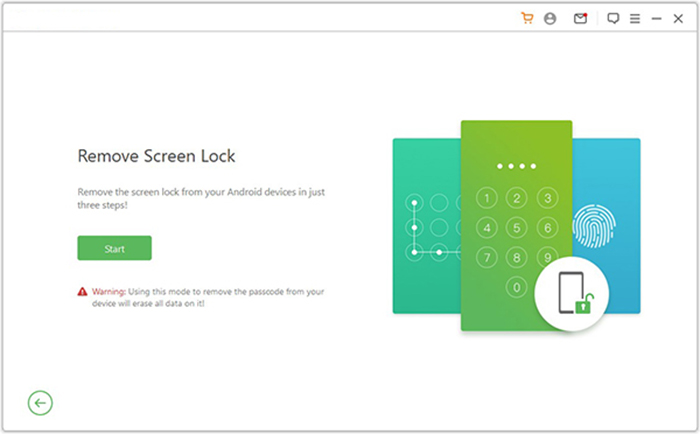
- If you are using a Samsung device, choose "Remove without Data Loss" and follow the on-screen instructions.
- For other brands, select "Remove Screen Lock" and click "Start."
- Since non-Samsung devices may experience data loss, it is recommended to back up important files beforehand.
- Connect your phone to the computer with a USB cable.
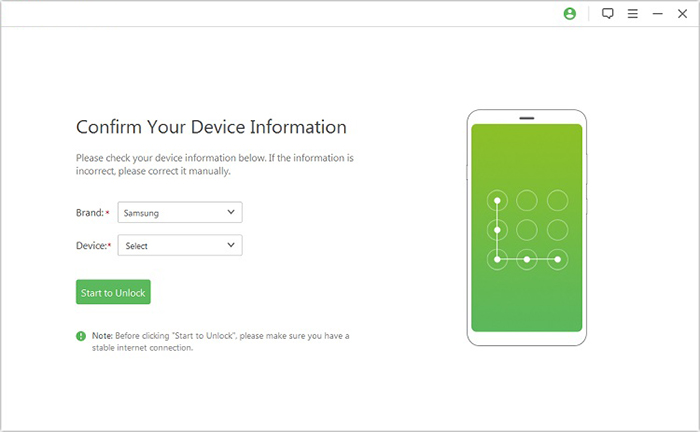
- The software will automatically detect your device information.
- Check that all details are correct, and if needed, modify them manually before clicking "Start to Unlock."
- The program will download and send the required data package to your device.
- Afterward, follow the on-screen instructions to reset your phone.

Our Thoughts on EaseUS MobiUnlock for Android:
Trying out EaseUS MobiUnlock for Android, we found the interface easy to follow and appreciated how quickly it guided us to remove a screen lock. On the plus side, it supports many Android brands and simplifies FRP bypass, but on the downside the process can erase data and may not works well with certain phone brands like TECNO, Infinix, etc., according to our tests.
For a solution with a higher success rate for phone unlocking, give Android Lock Wiper a shot. Finally, any queries? Please let us know below.
Related Articles:
SIM Unlock: 4 Hot Tips to Unlock SIM Card on Android Mobile Phones
EaseUS ChatTrans Review: Does It Deliver Good Results?
[2026] EaseUS MobiSaver Review: Recover Your Lost Data with Ease
