
nPhoneKIT Review: Is It Easy to Use & Effective? [Answered]
"nPhoneKIT - an open-source toolkit for Samsung, LG, and Android devices with tools like FRP unlock, screen unlock, and more. Would you love for me to try it out?" -- from Reddit
Android devices often have security measures that make accessing locked phones difficult, especially across different models, firmware versions, and security patches. This nPhoneKIT review helps readers determine if nPhoneKIT actually works on specific phone models, firmware versions, or security patches.
By exploring its features, compatibility, and user experiences, the article provides an honest view of the tool's performance. It also highlights both strengths and limitations, guiding readers to make an informed decision.
Disclaimer: This article covers nPhoneKIT and its alternative - Android Lock Wiper, which should only be used with the explicit permission of the device's rightful owner.
Part 1: What Is nPhoneKIT
nPhoneKIT is an open-source, free toolkit for phone unlocking, offering an alternative to proprietary software. It allows users to see every command run on their device, providing complete transparency throughout the process. Developed entirely in Python, it can be easily examined, customized, or expanded by advanced users. Despite being open-source, it still includes the standard unlocking features typically available in closed-source tools.
Part 2: Key Features of nPhoneKIT
nPhoneKIT offers a comprehensive set of tools for unlocking and managing Android devices, with full transparency and open-source flexibility. The table below highlights its key features, showing the range of functions it provides for Samsung and LG devices.
|
Feature
|
Description
|
|
FRP Unlock (U.S. Samsung 2024 Models) |
Removes Factory Reset Protection on most U.S. Samsung devices released in 2024. |
|
FRP Unlock (Aug–Dec 2022 Patch) |
Supports FRP removal on Samsung devices running security patches from August 2022 to December 2022. |
|
FRP Unlock (Pre Aug 2022 Patch) |
Enables FRP unlocking on older Samsung devices with security patches before August 2022. |
|
LG Screen Unlock (Pre G5) |
Unlocks the screen on LG models released before the G5 without erasing user data. |
|
Firmware & Version Detection |
Retrieves Android version, firmware, and system details on all Samsung devices. |
|
Samsung Reboot Options |
Reboots Samsung phones normally or directly into Download Mode. |
|
Android Device Reboot |
Allows standard reboot commands for most Android devices. |
|
WLANTEST Menu Access |
Opens the hidden WLANTEST diagnostic menu on all Samsung devices. |
Part 3: How to Download & Install nPhoneKIT
Before using nPhoneKIT, proper preparation on your computer (e.g. PC Windows 11) is essential to ensure the tool runs smoothly and recognizes your Android device correctly. The steps below outline how to set up the required drivers, environment, and dependencies before launching the software.
- Install USB drivers: Download Zadig from https://zadig.akeo.ie/ and install WinUSB and libusb-win drivers; for Samsung devices, also install Samsung USB Driver from Samsung's developer site.
- Download nPhoneKIT: Go to the latest release and download the Source Code (ZIP), then extract it to an accessible folder.
- Install Python and Pip: Ensure Python (version 3.10 recommended) and Pip are installed from the official Python website.
- Install dependencies: Open Command Prompt as Administrator, navigate to the extracted folder, and run: pip install pyserial requests pyqt5 && pip install -r ./deps/mtkclient/requirements.txt
- Run nPhoneKIT: Each time you use it, open Command Prompt as Administrator, go to the source folder, and execute: python main.py
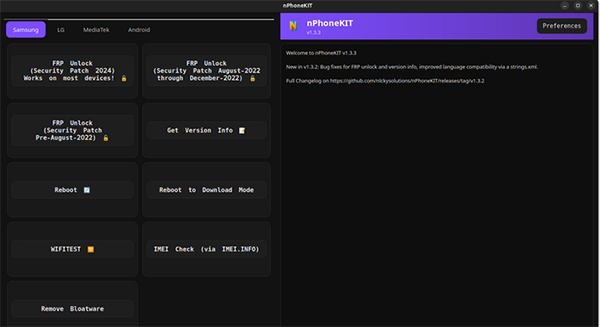
After the download and installation are complete, the program provides on-screen guidance to help authorized owners address FRP locks on Samsung, LG, or other Android devices. Users simply follow the displayed prompts to proceed in supported, legitimate scenarios without needing manual commands.
Part 4: Pros & Cons of nPhoneKIT
nPhoneKIT has attracted attention for its open-source approach and broad Android device support, but it is not without trade-offs. The pros and cons below help clarify what users can expect before deciding whether it suits their needs.
Advantages:
- Open-source and transparent: All executed commands are visible, which builds trust and allows users to understand exactly what happens on their device.
- Wide device coverage: Supports multiple Samsung security patch levels and offers screen unlock functions for older LG models.
- Free to use: No licensing fees, subscriptions, or forced payments are required.
- Community-driven project: Actively discussed and tested by developers and advanced users, with ongoing improvements.
- Generally viewed as legitimate: Independent site checks and user feedback suggest it is not outright malicious.
Disadvantages:
- Mixed trust signals: Some website reputation checks show caution flags, which may concern less technical users.
- Still in beta stages: Occasional bugs, failed operations, or unstable behavior are reported, especially on newer firmware.
- Steep learning curve: Requires Python setup, driver installation, and comfort with technical steps.
- Limited compatibility: Does not guarantee success on all Android models or the latest security patches.
- Sensitive use cases: As an unlocking toolkit, misuse can lead to legal or account-related issues if used improperly.
Part 5: What If nPhoneKIT Doesn't Work
Even reliable tools like nPhoneKIT may encounter issues on certain devices or firmware versions. The list below outlines practical steps and alternatives to try if the software does not work as expected.
- Check device compatibility: Ensure your phone model, firmware version, and security patch are supported by nPhoneKIT.
- Update dependencies: Verify Python, Pip, and all required libraries are correctly installed and up to date.
- Run as Administrator: Make sure Command Prompt is opened with administrator privileges to avoid permission issues.
- Try another USB port or cable: Faulty connections can prevent proper communication with the device.
- Restart the device and PC: A simple reboot can fix recognition or driver issues.
- Consult the community: Check forums or GitHub issues for tips from users with similar devices.
- Use official recovery methods: For FRP or account locks, try Google's account recovery or the manufacturer's support.
- Consider professional tools: If open-source solutions fail, professional Android unlocking or repair tools may offer more reliable results.
Part 6: What Could Be Better than nPhoneKIT [More Capable]
For Android users facing FRP or screen lock issues, Android Lock Wiper offers a straightforward solution for bypassing these restrictions. It provides a fully guided interface that simplifies the unlocking process compared with nPhoneKIT's command-line setup.
Supporting a wide range of Samsung, LG, and other Android devices, it serves as a versatile alternative for reliable FRP removal. With one-click operations and clear step-by-step instructions, it allows users to unlock their phones safely and efficaciously.
What Can Android Lock Wiper Help You with?
- FRP Unlock: Remove Google account locks without credentials.
- Screen Lock Removal: Securely bypass patterns, PINs, passwords, and fingerprints.
- Device Support: Works with Samsung, LG, and many Android models.
- User-Friendly: Step-by-step guidance for easy use.
- One-Click Operation: Unlock quickly with minimal steps.
- Safe and Secure: Protects privacy and, in some modes, preserves data.
- Fast Unlocking: Processes locks efficiently.
- Unlock Samsung devices without losing data.

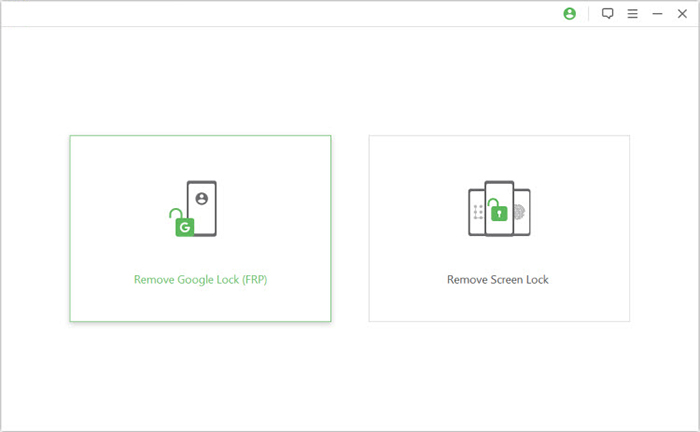
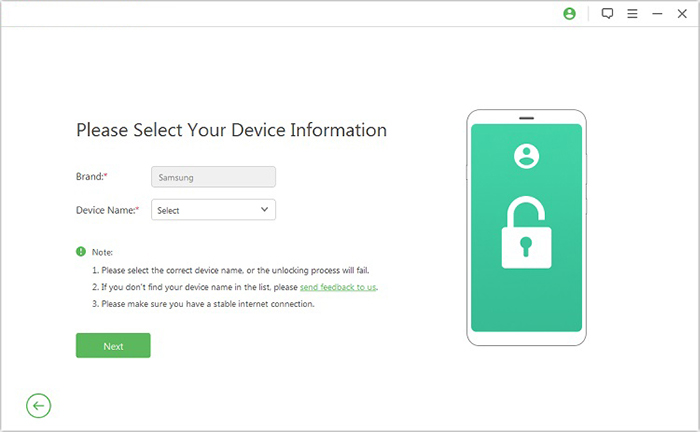
Let's take unlocking the FRP lock on an Android phone as an example to show you how it works:
- Install the software on your computer, launch it, select "Remove Google Lock (FRP)", and switch to Advanced Mode.
- Connect your device to the computer using a USB cable and click "Start" to initiate the FRP removal process.
- Provide the requested device details, click Next, and follow the on-screen instructions to boot your phone into recovery mode.
- On the next screen, choose the correct PDA, country, and carrier, then press Download to retrieve the necessary data package.
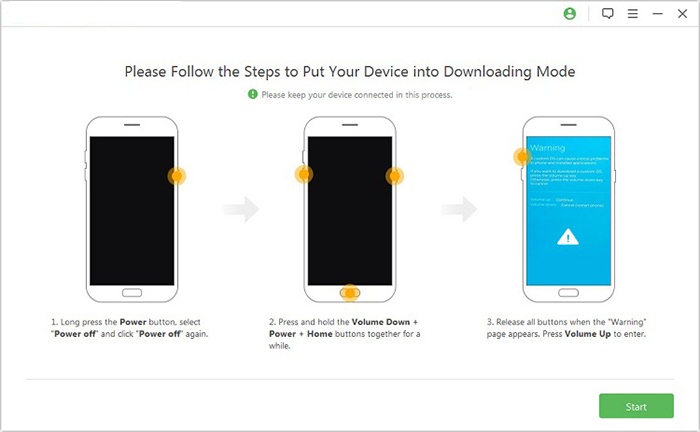
- Click "Start to Extract" and follow prompts to enter Download Mode.
- Enable USB debugging and OEM unlock, allowing the software to extract.
- Prepare the firmware for the next steps and follow the guide to complete the FRP removal.
Calling It a Wrap
Although nPhoneKIT offers transparency and a variety of unlocking features, it is often complicated to use and has a relatively lower success rate on many devices. For those seeking a simpler and more reliable solution, Android Lock Wiper is a better alternative, providing guided steps, wider device support, and higher chances of successfully removing FRP or screen locks.
Related Articles:
Top 11 Android Flashing Software for PC/Mac You Wish You'd Known Sooner
5 Verified Ways: How to Recover Data after Factory Reset on Samsung
9 Best iPhone Unlock Software to Unlock Passcode [2026]
10 Tested Android Backup Software/Apps You Should Never Miss
