
RiseRom FRP Tool Review: Is It Safe to Use? Any Trusted Alternatives?
TL;DR:
RiseRom FRP Tool has attracted attention from Android users seeking ways to bypass Factory Reset Protection. However, some may require a safer alternative like Android Lock Wiper because,
- Android Lock Wiper offers a professional and user-friendly approach to bypassing FRP locks, with broader compatibility across Android versions.
- It provides a more secure pathway compared to free utilities, reducing risks of malware and ensuring smoother access recovery for legitimate device owners.
The growing demand for tools that can bypass FRP (Factory Reset Protection) locks on Android devices has led many users to explore options like RiseRom FRP Tool. This preface introduces an impartial RiseRom FRP Tool review based on our trial experience and trusted sources, aiming to determine whether it is a safe, effective, and reliable solution for bypassing FRP locks.
NOTE: We support unlocking mobile phones only for lawful and rightful purposes, and we firmly discourage any use that involves illegal activity. Thank you for respecting this principle.
- Part 1: What Is Riserom FRP Bypass
- Part 2: What Are the Main Functions of Riserom FRP Bypass
- Part 3: Is It Safe & Free to Use Riserom FRP Bypass
- Part 4: How to Download & Use Riserom FRP Bypass
- Part 5: What Are the Good & Bad of Riserom FRP Bypass
- Part 6: Is There a Safer Alternative to Riserom FRP Bypass [Trouble-free]
- FAQs about Riserom FRP Bypass
Part 1: What Is Riserom FRP Bypass
Riserom FRP Bypass is a third-party website that provides APKs and tools to bypass Google's Factory Reset Protection (FRP) on Android devices. While it offers files for brands like Samsung, Huawei, LG, and Xiaomi, it is not an official or trusted source, meaning downloads may carry risks such as malware or incompatibility. For safer experience, you can try its trusted alternatives, which will be said in this article.
You Might Also Enjoy: Top 4 Best TCL FRP Bypass Solutions You Should Never Miss
Part 2: What Are the Main Functions of Riserom FRP Bypass
Before diving into the detailed breakdown, it's important to note that Riserom FRP Bypass is primarily designed to help users bypass Google's Factory Reset Protection (FRP) on Android devices. Beyond that, it also provides firmware files, guides, and custom ROMs, which extend its utility for troubleshooting and device recovery.
|
Function
|
Description
|
Use Case
|
|
FRP Unlock
|
Provides APKs and tools to bypass Google account verification after a factory reset. |
Regain access to locked Android devices. |
|
Firmware Files
|
Hosts stock ROMs and combination files for Samsung, Huawei, LG, Xiaomi. |
Used for flashing devices or repairing software issues. |
|
Step-by-Step Guides
|
Offers tutorials for bypassing FRP on different brands. |
Helps beginners follow instructions without technical expertise. |
|
Custom ROMs
|
Provides modified ROMs for certain devices. |
Used to bypass restrictions or customize Android systems. |
|
Device Compatibility
|
Supports multiple brands and models, though not always updated. |
Useful for older devices where official tools fail. |
|
Free Downloads
|
APKs and files are free to access. |
Attracts users who want cost-free solutions. |
Part 3: Is It Safe & Free to Use Riserom FRP Bypass
Is Riserom FRP Bypass Safe?
No, it is not considered safe to use Riserom FRP Bypass. Here's why:
- Unverified source: Riserom is not affiliated with Google or major developers, and its files are not listed on Google Play.
- Malware risk: APKs from unofficial sites can be modified with spyware or viruses.
- Legal concerns: FRP bypass may violate Google's terms of service and local laws.
- Outdated tools: Many files are reported to be incompatible with newer Android versions, leading to instability.
- No developer transparency: Lack of clear ownership makes it impossible to verify authenticity.
Is Riserom FRP Bypass Free?
Yes, Riserom FRP Bypass is free to use. According to its website, the platform provides free APKs, firmware files, and guides for bypassing Google's Factory Reset Protection (FRP). However, while the downloads themselves are free, the risks - such as malware, outdated tools, and lack of developer transparency - make it unsafe compared to professional paid solutions like Android Lock Wiper.
Part 4: How to Download & Use Riserom FRP Bypass
To download Riserom FRP Bypass, you need to visit the Riserom website or one of the guides like iMobie's FRP tool page. From there, you'll find direct links to the APK files or firmware packages, which can be saved to your computer or directly onto your Android device before installation.
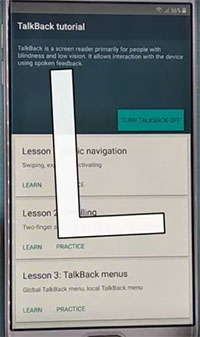
- Power on device > Confirm FRP lock, return to "Hello" screen, and press both volume keys for 3 seconds to activate TalkBack.
- Enable TalkBack > Tap "Turn on," draw a reverse L gesture, then select "While Using the App."
- Open Settings > Choose "Use Voice Commands," say "Open Settings," then disable TalkBack with the volume keys.
- Launch Phone Clone > Go to System > Phone Clone, agree to terms, select "This is a new phone," then choose "Android."
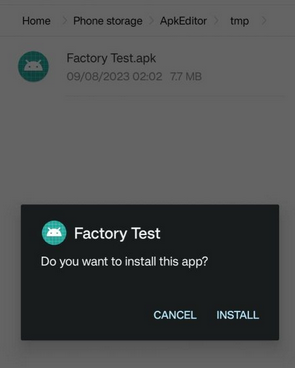
- Download APKs > On another phone, visit Riserom.com and download "Factory_test.apk" and "QuickShortcutMaker.apk."
- Transfer APKs > Use Phone Clone to send both APKs to the locked device.
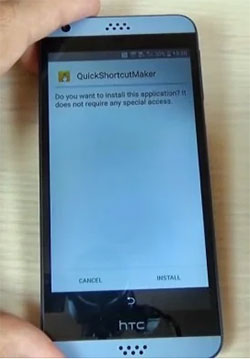
- Install QuickShortcutMaker > From the transfer history, install QuickShortcutMaker.apk.
- Install Factory Test > Install Factory_test.apk, then open QuickShortcutMaker.
- Run Engineering Test > Search "engineering," select "Factory Test - Engineering Test," tap "Try," then choose "Engineering Test 3."
- Finalize bypass > Press "Back to Home" and select "Initialize to English" to complete FRP removal.
Part 5: What Are the Good & Bad of Riserom FRP Bypass
Riserom FRP Bypass offers free tools and guides but comes with serious risks: malware, legal concerns, and outdated compatibility. Here are its advantages and disadvantages:
Good Aspects
- Free access > Provides APKs and firmware files without cost.
- Multi-brand support > Bypass FRP on Samsung, Huawei, LG, Xiaomi, and other Android devices.
- Step-by-step guides > Offers tutorials for bypassing FRP, making it approachable for beginners.
- Custom ROMs > Includes modified ROMs for advanced users who want more control.
- Quick availability > Files are readily downloadable without registration.
Bad Aspects
- Unverified source > Not affiliated with Google or major developers, raising trust concerns.
- Malware risk > APKs may contain spyware or viruses.
- Legal issues > FRP bypass may violate Google's terms of service and local laws.
- Outdated tools > Many files don't work on newer Android versions.
- Complex process > Requires multiple steps, including TalkBack activation and APK transfers, which can be confusing for non-technical users.
- No developer transparency > Lack of clear ownership or support makes troubleshooting difficult.
Part 6: Is There a Safer Alternative to Riserom FRP Bypass [Trouble-free]
If you want a safe, reliable, and beginner-friendly FRP bypass solution, Android Lock Wiper is a strong alternative to Riserom FRP Bypass. It avoids the malware risks of unverified APKs and provides professional support for a smoother unlocking experience. Here are its main features:
- FRP Bypass - Removes Google FRP lock without account details.
- Screen Unlock - Clears PIN, password, pattern, fingerprint, or face locks.
- No Prerequisites - Works without prior credentials or technical skills.
- Wide Support - Compatible with 6,000+ Android devices.
- Easy Interface - Beginner-friendly guided steps.
- Data Protection - Minimizes data loss, especially on Samsung.
- Version Coverage - Supports Android 6.0 and earlier.
- Safer Alternative - Verified software, unlike risky Riserom APKs.
- Trial & Paid - Free trial available, full features in paid version.
Download It Safely - No ads, No bundled apps, and no background uploads.

How to use the best alternative to DT Pro Tool?
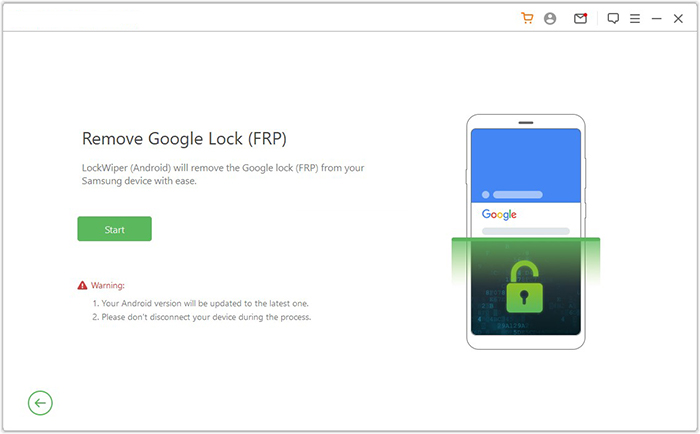
01: Install and Launch Tool:
- Begin by downloading and installing the FRP bypass software on your computer;
- Complete installation;
- Open the program;
- Select Remove Google Lock (FRP) in Advanced Mode.
02: Connect Device and Configure
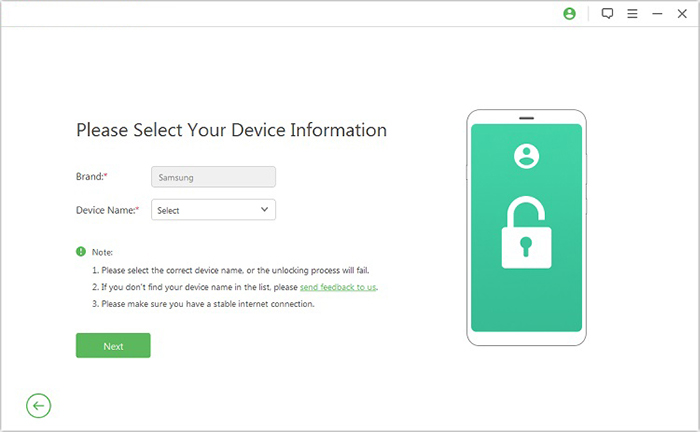
- Attach your Android phone via USB and prepare it for bypass;
- Click Start to begin;
- Enter required device details;
- Follow prompts to enter Recovery Mode;
- Select PDA, country, and carrier.
03: Download and Unlock
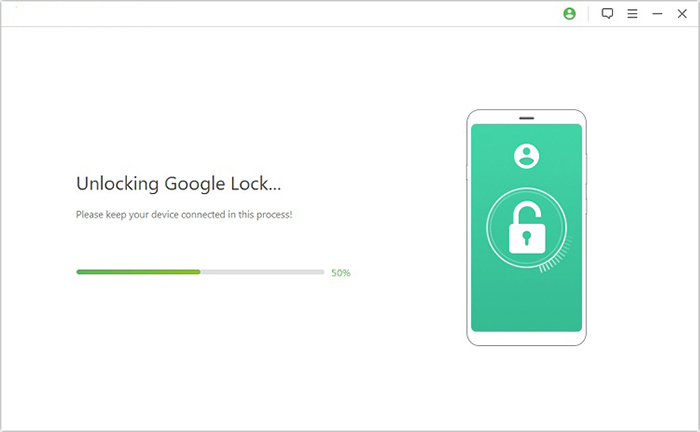
- Retrieve necessary data and execute the bypass;
- Download the data package;
- Extract firmware and enable USB debugging;
- Activate OEM unlock;
- Follow on-screen steps until FRP lock is removed.
FAQs about Riserom FRP Bypass
Q1: Any better APK alternatives to Riserom FRP Tool?
Yes. Safer APK repositories include APKMirror, APKPure, and FRPBypass.cc, which verify files before distribution.
Q2: Does Riserom require a PC?
No, most APKs can be installed directly on the locked phone, though transferring files often requires another device.
Q3: Can Riserom bypass the latest Android versions?
Not reliably. Many of its tools are outdated and fail on newer Android security patches.
Q4: Is Riserom legal to use?
Legality varies by region. In many cases, bypassing FRP violates Google's terms of service and may be unlawful.
Q5: Does Riserom offer customer support?
No official support exists, making troubleshooting difficult if something goes wrong.
Q6: Can Riserom damage my phone?
Yes, incorrect use or corrupted files can brick your device or cause permanent software issues. (How to unbrick an Android phone?)
Q7: Does Riserom work for iPhones?
No, it is strictly for Android devices.
Q8: Can beginners use Riserom easily?
Not really. The process involves TalkBack activation, APK transfers, and hidden settings, which can be confusing.
Q9: Does Riserom provide firmware files?
Yes, it hosts stock ROMs and combination files for certain brands, though authenticity is questionable.
In a Nutshell
RiseRom FRP Tool occupies a curious space in the world of Android utilities - promising relief for those locked out of their devices, yet requiring careful scrutiny to ensure safety and reliability. Our impartial review highlights both its potential and its limitations. Rather than closing the discussion, this conclusion serves as an open door: the real value lies in informed choices, not quick fixes.
Related Articles:
How to Take a Full Backup of Android Phone? 7 Tested Methods
How to Mirror Android to Mac without Obstacle? 8 Desirable Ways
5 Easy Ways to Recover Data from Locked Android Phone with Broken Screen
Top 8 iCloud Bypass Tools to Remove Activation Lock from iPhone/iPad
