
Wiko FRP Bypass: 4 Safe Ways to Bypass FRP on Wiko Phones [2026]
If a Wiko phone is reset without removing the previously linked Google account, FRP may still remain active, requiring verification of the original account before the phone can be used again. This situation is common when someone forgets their credentials, buys a second-hand device, or performs a reset through recovery mode.
In the following guide, you will learn Wiko FRP bypass with 4 clever strategies to help restore normal access to your device.
Option 1: How to Remove Wiko FRP Using Talkback
TalkBack is an Android accessibility feature designed to help visually impaired users navigate the screen using spoken feedback and gestures. In some older Android systems, it has been associated in tutorials with methods that attempt to access system menus during setup, which is sometimes discussed in relation to removing Wiko FRP using TalkBack.
The following sections will explain how it is commonly described for Wiko devices running Android 11 and Android 10 or earlier.
For Wiko phones running Android 11:
- Power on the Wiko device and connect to Wi-Fi on the setup screen.
- Go to Vision Settings > TalkBack > Enable TalkBack.
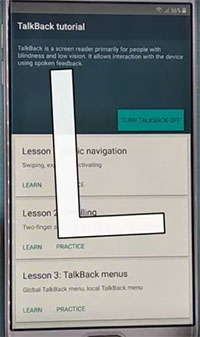
- Use TalkBack gestures (commonly "L" gesture) to open the Global Context Menu.
- Enter TalkBack Settings or Help & Feedback (if available on the device).
- Attempt to access a web link or privacy page to reach a browser (if not blocked).
- If browser access opens, some guides proceed to Google account sign-in or settings navigation.
For Wiko phones running Android 10 or earlier:
- Start the setup and connect the phone to the Wi-Fi network.
- Open Vision Settings > TalkBack > Turn ON TalkBack.
- Draw an "L" gesture to open TalkBack shortcut menu.
- Open TalkBack Settings > Help & Feedback (or similar menu).
- Try opening a video, support page, or share link to access a browser.
- If browser access is available, older guides may proceed to APK download or account setup steps.
You May Also Like: How to Unlock Wiko Phone with or without Preconditions? 5 Tactics
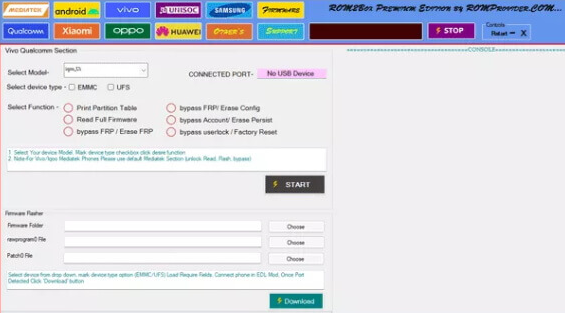
Option 2: How to Bypass Wiko Google FRP via ROM2box
ROM2Box is a Windows-based MediaTek servicing tool used for tasks such as flashing firmware, partition management, and device repair on MTK Android phones. In some repair workflows, it is associated with bypassing Wiko Google FRP via ROM2Box by interacting with the device in BROM or preloader mode. The following section will use the Wiko T30 as an example to explain how this process is typically performed on supported MediaTek devices. Here's how:
- Install the ROM2Box tool, MediaTek USB drivers, and ensure a compatible Wiko T30 firmware/MTK support is ready on your PC.
- Open ROM2Box (Run as Administrator) and go to the MTK Service/FRP section.
- Select the "Bypass FRP" or "Remove FRP Lock" option.
- Power off the Wiko T30 completely, then connect it to the PC using a USB cable while triggering BROM/Preloader mode (volume key combo if required).
- Wait for ROM2Box to detect the device, then click START to begin the FRP process.
- Once completed, disconnect and reboot the phone to finish setup.
Option 3: How to Bypass Wiko FRP Lock via MCT MTK FRP Bypass
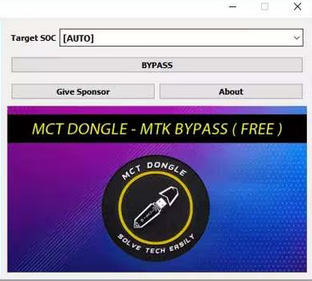
MCT MTK FRP Bypass is a utility designed to remove FRP (Factory Reset Protection) on MediaTek-based Android devices. It is commonly used to bypass Wiko FRP lock, helping users regain access when a device is stuck on Google verification. However, it only works on Wiko phones running Android 9 to Android 11, so it is not compatible with newer or older Android versions. Here's how:
- After opening the extracted folder, launch the main executable.
- Turn off your Wiko phone, then press and hold Power and Volume Up while plugging it into your computer via USB.
- This places your Wiko in a mode ready to accept commands from the MCT MTK Bypass Tool.
- Choose your phone's version, click "Bypass", and the FRP lock will be removed - guaranteeing that all commands are customized to your device.
People Also Like: MCT MTK FRP Bypass Tool Review: Comprehensive Analysis [Latest]
Option 4: How to Bypass Wiko FRP via Android Lock Wiper [Highly Professional]
For users locked out after a reset, Android Lock Wiper can be used to perform Wiko FRP bypass and regain access to the device without the previous Google account. Its FRP bypass feature removes Google FRP verification directly, allowing Wiko T50, T30, T20, T10, Power U30, Power U20, Y82, Y62, Y52, Y51, etc., to be unlocked quickly.
The program also supports screen lock removal, enabling deletion of PINs, patterns, passwords, fingerprints, and face locks when the credentials are forgotten. Through automatic detection and wide compatibility, the software recognizes the connected device and applies a suitable unlocking method across many Android and Wiko models.
Its clear step-by-step guidance, together with a high success rate, helps users complete the unlocking process with minimal technical effort.
How to bypass Google FRP lock on Wiko with Android Lock Wiper?
- Begin by downloading and installing the phone unlocking software on your computer.
- After installation, select "Remove Google Lock (FRP)" and opt for "Advanced Mode."
- Connect your Wiko device to the computer using a USB cable.
- Click the "Start" button to initiate the process of removing the Google lock.
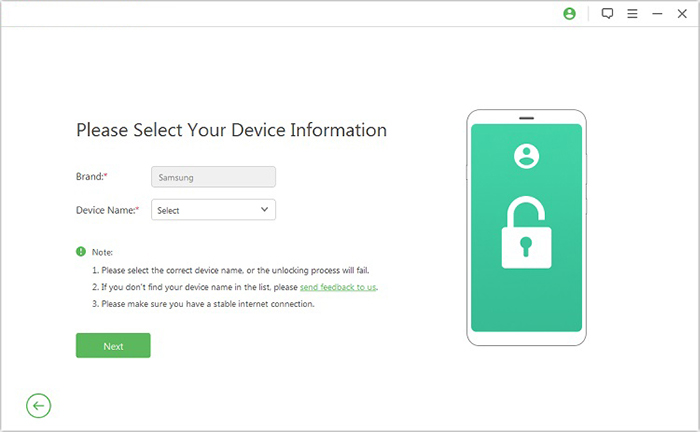
- Follow the prompts to input your Wiko information, then click "Next."
- Continue with the on-screen instructions to place your Wiko into recovery mode.
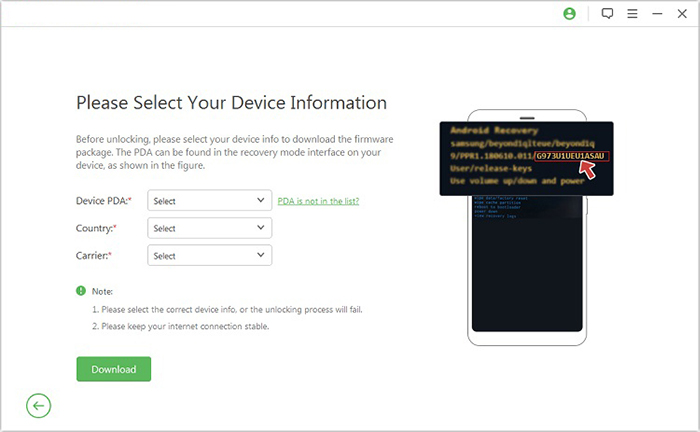
- On the subsequent screen, select the correct PDA, country, and carrier.
- Tap "Download" to acquire the necessary data package.
- Click "Start to Extract" and adhere to the on-screen instructions to set your Wiko in Download Mode.
- Enable USB debugging, activate OEM unlock, extract the firmware, and complete any additional required steps.
- Once completed, the program will commence the unlocking of the Wiko FRP lock.

FAQs about Wiko FRP Bypass
Q1: Why does FRP appear on my Wiko phone?
It appears when the device is reset without removing the Google account beforehand, as a protection measure against unauthorized access.
Q2: What should I do if I forgot my Google account password?
You can reset your password using Google's account recovery process on a trusted device or browser.
Q3: Is Wiko FRP bypass legal?
Bypassing FRP without proper ownership verification may violate device security policies. The correct approach is always account recovery or official support.
Q4: Can a Wiko phone be unlocked after FRP lock?
Yes, but it typically requires signing in with the original Google account or verifying ownership through official service centers.
Q5: Why does FRP still appear after a factory reset?
Because the Google account was not removed before resetting the device, so Google's protection system remains active.
Q6: Can customer support help with the Wiko FRP lock?
Yes, official support or authorized service centers may assist if you can prove device ownership.
Q7: Will flashing firmware remove FRP on Wiko?
In most modern Android versions, FRP remains active even after firmware updates or resets.
Q8: What is the safest way to avoid FRP lock in the future?
Before resetting a phone, always remove the Google account and ensure all sync accounts are signed out properly.
Q9: Can I recover data after the FRP lock appears?
FRP itself does not erase data stored before reset, but access to the device is restricted until verification is completed.
Q10: What is the best way to remove Wiko FRP safely without the Google account?
If you cannot access the original Google account, using a reliable FRP removal tool is often the most practical solution. Android Lock Wiper is widely considered one of the safest options because it can remove the Wiko FRP lock without requiring the previous Google account or additional prerequisites. With a simple on-screen process and broad Android compatibility, it helps users regain access to their devices quickly.
Related Articles:
BLU FRP Bypass: 6 Wise Tactics to Bypass Google FRP Lock on BLU
3 Most Marvelous Means to Back Up Android Phone with Broken Screen
5 Tactics to Recover Formatted Data from Android Phone with/without Backup
How to Mirror Android to Mac without Obstacle? 8 Desirable Ways
