
iMobie AnyMirror Review: Is It Really as Claimed? Answered Here
You may turn to iMobie AnyMirror review when you want to evaluate its capabilities and decide if it meets your mirroring needs. Some may often search to confirm if it supports audio, cameras, microphones, recordings, screenshots, or live streaming, ensuring the tool can handle all their intended tasks.
This review will provide a clear overview of AnyMirror's strengths, limitations, practical usability, and more to help readers make an informed decision.
- Part 1: iMobie AnyMirror: Brief Introduction
- Part 2: iMobie AnyMirror: Pricing & Safety
- Part 3: iMobie AnyMirror: User Reviews & Ratings
- Part 4: Frequently Asked Questions about iMobie AnyMirror
- Part 5: iMobie AnyMirror: Advantages & Disadvantages
- Part 6: What's the Best Alternative to iMobie AnyMirror
Part 1: iMobie AnyMirror: Brief Introduction
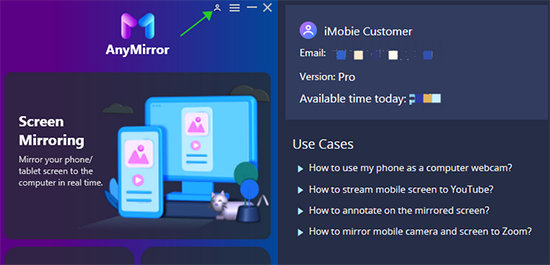
Users can utilize iMobie AnyMirror to mirror Android and iOS screens, along with audio, cameras, and microphones, directly to a computer for seamless control and viewing. Multiple devices can be streamed simultaneously, each displaying different content, which is ideal for presentations or collaborative work.
The software also allows real-time recordings and high-quality screenshots during mirroring, ensuring important moments are captured accurately. For live streaming needs, screens, audio, cameras, and microphones can be broadcast directly to platforms like YouTube or Zoom, with flexible connections via Wi-Fi or a stable USB cable.
Part 2: iMobie AnyMirror: Pricing & Safety
Summary: AnyMirror provides a usable free version (with limitations) and an affordable yearly Pro plan for unlimited mirroring. Officially it claims to be secure, offer SSL protection, and allow refunds within 15 days. However - as with many such tools - real-world feedback shows mixed reliability depending on device model or connection method.
|
Category
|
Details/Notes
|
|
Pricing Plans |
- Free (Basic): limited to daily mirroring up to 20 minutes, 1 source, watermark included. - Pro (Paid): about US$35.99/year, unlimited mirroring time and devices, no watermark, full features including live-streaming. |
|
Supported OS (Computer) |
(Devices) Android (version 5 and above) and iOS devices (iPhone, iPad, iPod), covering a broad range of devices. |
|
Supported Mobile OS |
Lets you back up your data from your device to a computer, with no storage limit. |
|
Safety & Security Claims |
Advertised as SSL-secured and free from malware when downloaded officially; includes a 15-day money-back guarantee for paid plans. |
|
Real-world Safety/Reliability Warnings |
Some users report instability with Wi-Fi or USB connections, occasional crashes, failed mirroring, and limitations in the free version. |
Part 3: iMobie AnyMirror: User Reviews & Ratings
iMobie AnyMirror has a mixed reputation - some users appreciate its mirroring features and simplicity, but a significant number experience frequent failures, connection issues, and find the free version very limited.
|
Metric
|
Positive Feedback
|
Negative Feedback
|
|
General Ratings
|
Some users give around 4.1/5 stars, appreciating basic functionality. |
On certain app stores, ratings are lower (~2.4/5), reflecting dissatisfaction. |
|
Liked Features
|
Users like the ability to mirror screens from Android/iOS to PC and find the interface reasonably simple. |
- |
|
Common Complaints
|
- |
Frequent issues include connection problems (Wi-Fi/USB), crashes or freezes, blank screens, audio/mic/camera failures, and tight limitations in the free version. |
|
Reliability/Consistency
|
For some, mirroring works decently for gaming, streaming, or presentations. |
Many users report inconsistent performance across different devices and OS versions. |
Part 4: Frequently Asked Questions about iMobie AnyMirror
Q1: Can I mirror multiple devices at the same time?
Yes, AnyMirror allows you to stream multiple devices simultaneously, with each showing different content on your PC.
Q2: Can I record or take screenshots while mirroring?
Absolutely. AnyMirror lets you make real-time recordings and capture high-quality screenshots during mirroring sessions.
Q3: What are common issues users face when using iMobie AnyMirror?
Some users report connection instability, crashes, failed mirroring, or limited functionality in the free version. Performance may also vary depending on the device model and OS version.
Q4: What is the background or profile of iMobie company?
iMobie is a software company that specializes in developing mobile management and optimization tools for iOS and Android devices. Its products focus on data transfer, device unlocking, and system maintenance, aiming to simplify device management for both everyday users and professionals.
Part 5: iMobie AnyMirror: Advantages & Disadvantages
Why Like It?
- Can mirror Android and iOS screens, audio, cameras, and microphones to a PC.
- Supports streaming multiple devices simultaneously, each showing different content.
- Allows real-time recordings and high-quality screenshots during mirroring.
- Enables live streaming to platforms like YouTube, Zoom, or other video calls.
- Flexible connection options: Wi-Fi for convenience or USB for stable performance.
- User-friendly interface suitable for beginners and advanced users alike.
Why Don't Like It?
- Free version is limited: time restrictions, single device, and watermarks.
- Some users report unstable connections or crashes when using Wi-Fi or USB.
- Audio, microphone, or camera mirroring can fail on certain devices.
- Performance and reliability vary depending on device model and OS version.
- Requires a paid subscription to unlock full features and unlimited mirroring.
Part 6: What's the Best Alternative to iMobie AnyMirror
When using iMobie AnyMirror, some may face occasional instability during Wi-Fi or USB connections and the limited functionality, which restricts mirroring time and device support. For a more reliable and fully featured solution, Screen Mirror offers greater stability, smoother performance, and unlimited mirroring without time or device restrictions.
It also provides robust support for both Android and iOS devices, ensuring consistent screen and audio mirroring to a computer. As a result, this product serves as a better alternative for anyone looking to mirror their devices seamlessly and without interruptions.


How to use the more raliable replacement for iMobie AnyMirror? (Let's first assume that you are using an Android phone)
- Download and install the Screen Mirror application on your computer. After that, launch the utility.
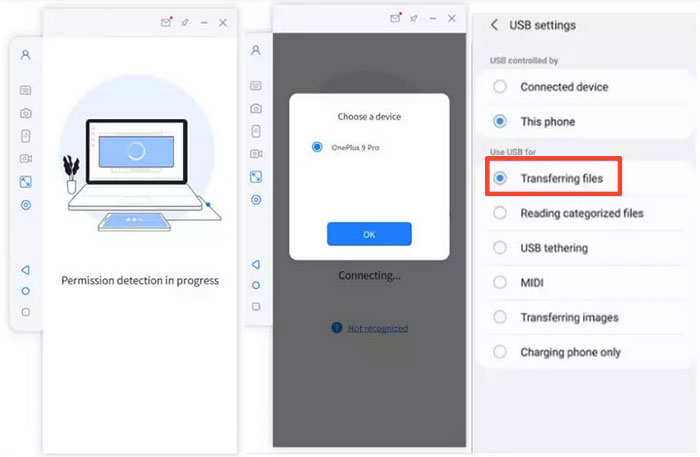
- Connect your Android device to this PC using a USB cable and choose your device. Subsequently, opt for "Transfer files" to establish the connection.
- Navigate to your phone's "Settings" > "About phone" > "Software information" > tap "Build number" seven times > access "Developer options". Then return to "Settings" to enable USB debugging on your Android device.
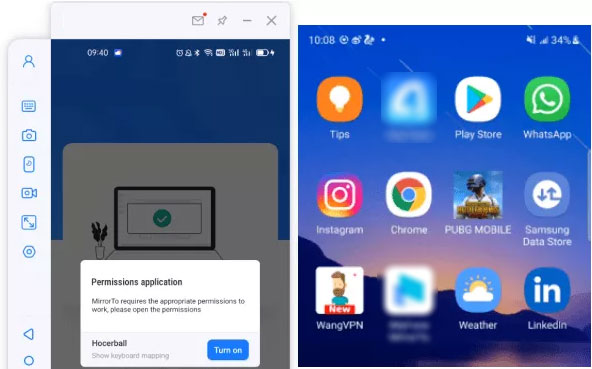
- Authorize the program and permit it to display overlays. Afterward, click "Turn on" to download the Screen Mirror application on your phone.
- Ultimately, you will successfully mirror your Android phone to the PC, allowing you to control the phone from the computer with ease.
You Might Also Enjoy: Wish to mirror your iPhone/iPad to your computer? Here are the top 5 means.
Finalization
iMobie AnyMirror offers a versatile solution for screen mirroring and streaming, supporting multiple devices and a range of content types, but its performance can vary depending on device and connection method. By discovering both its overall performance and limitations, you can decide whether AnyMirror meets your needs or if alternatives like Screen Mirror may provide a more stable and fully featured experience.
Related Articles:
iMobie PhoneRescue for Android: Can It Deliver as Promised?
iMobie AnyTrans Review: Does It Perform Reliably? [Ultimate Guide]
iMobie AnyDroid Review 2026: Is It a Scam or Legit?
DroidKit Review: Is It Worth Your Investment? [An Experience Report]
