
Contacts+ Review 2026: Key Details, Pros, Cons, & 1 Replacement
TL;DR:
Contacts+ is best understood by looking at how it performs in real use, not just on paper, and this review brings those practical strengths and weaknesses into clear focus. By walking through its features, limitations, pricing, and user feedback, it gives you a grounded sense of whether the app truly fits your workflow.
If you're looking for more control, reliability, or offline flexibility, tools like MobiKin Assistant for Android offer a stronger alternative for managing and safeguarding your contacts.
Before choosing a contact management tool, many users want to understand how well the app performs in real-world use before deciding whether it's worth using or paying for. This Contacts+ review is written with that exact goal in mind, looking beyond feature lists to examine actual user experience, reliability, and value.
By exploring what Contacts+ does well and where it may fall short, this review helps you make a more informed decision based on practical insights rather than marketing claims.
Stay centered on the video below to grasp the concept through visuals.
Part 1. Contacts+: Brief Overview
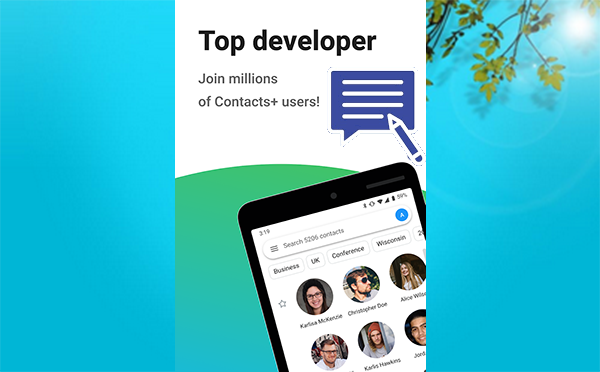
Contacts+ is a cloud-based address book designed for professionals, teams, and small businesses, allowing contacts to sync seamlessly across Android, iOS, Mac, PC, Gmail, Exchange, and Office365. It offers a centralized dashboard to import contacts from Google, Apple, or Microsoft accounts, deduplicate entries, and organize information using notes and tags.
By keeping a unified and consistent contact directory across platforms, Contacts+ helps users save time and focus more on building relationships instead of manual data management.
Part 2. Contacts+: Pricing & Security
The following table outlines the key details of Contacts+ pricing plans and the security measures it uses to protect user data. It provides a quick overview to help you understand both the cost and safety aspects of the service at a glance:
|
Aspect
|
Details
|
|
Free Plan |
Allows syncing up to 1,000 contacts with basic contact management features. |
|
Premium Plan |
Costs about $9.99 per month or $99.99 per year, supporting multiple accounts, up to 25,000 contacts, fast syncing, and contact enrichment. |
|
Teams Plan |
Priced at approximately $12.99 per user per month, offering shared address books and collaboration features for teams. |
|
Data Encryption |
Uses TLS encryption to protect data in transit and AES-256 encryption for data stored on servers. |
|
Infrastructure Security |
Hosted on secure cloud infrastructure with firewalls, access controls, and regular security monitoring. |
|
Compliance & Privacy |
Follows industry security standards and complies with major data protection regulations such as GDPR and CCPA. |
Part 3. Contacts+: Integrations & Support
Contacts+: Integrations
- Connects with tools like Zapier to automate workflows and sync contacts with hundreds of supported apps.
- Integrates with popular platforms such as Google Workspace, Microsoft tools, Slack, Mailchimp, Google Sheets, CRM systems, and other productivity software.
Contacts+: Support
- Provides customer support via email/help desk and live chat.
- Offers self-help resources including a knowledge base, FAQs, documentation, webinars, and support videos.
Part 4. Contacts+: Pros & Cons
The table below highlights the main advantages and disadvantages of using Contacts+. It helps you quickly evaluate whether the app fits your contact management needs.
|
Pros
|
Cons
|
|
Syncs contacts across multiple devices and accounts (iOS, Android, Gmail, Exchange, Office365). |
Some advanced features require a paid subscription. |
|
Centralized dashboard with deduplication, notes, and tags for better organization. |
May be more than what casual users need. |
|
Integrates with many productivity and CRM tools. |
Learning curve for users unfamiliar with contact management platforms. |
|
Helps teams share and collaborate on contact lists. |
Sync limits on lower-tier plans. |
|
Saves time by automating manual contact updates. |
Occasional sync delays reported by some users. |
|
Cloud-based access ensures contacts are always backed up and available even if a device is lost or replaced. |
Reliable performance depends on an internet connection, which may limit offline usability. |
Part 5. Contacts+: Frequently Asked Questions
Q1: How many contacts can I sync with Contacts+?
The number of contacts you can sync depends on your subscription plan, with free plans having lower limits and paid plans supporting tens of thousands of contacts.
Q2: Can Contacts+ merge duplicate contacts?
Yes, Contacts+ automatically detects duplicate contacts and allows you to merge them, helping keep your address book clean and consistent.
Q3: Can teams share contact lists?
Yes, team and business plans enable shared address books so team members can access and update common contact data collaboratively.
Q4: Can I import contacts from other services?
You can easily import contacts from Google, Apple, Microsoft, and other platforms, reducing the need for manual data entry.
Q5: Can I add custom notes and tags to contacts?
Contacts+ allows you to add notes, tags, and custom fields, making it easier to organize and retrieve contacts based on context or relationship.
Q6: Is contact syncing automatic?
Once accounts are connected, Contacts+ automatically syncs changes across all linked devices and services without manual intervention.
Part 6. Contacts+: User Reviews
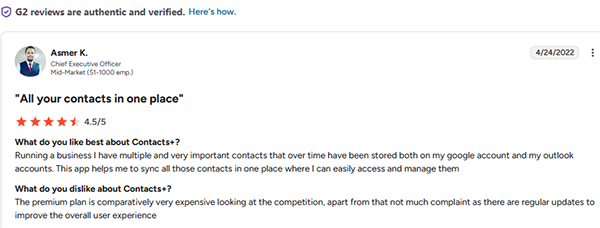
User reviews of Contacts+ show mixed opinions across platforms, with many G2 users praising its ability to centralize and sync contacts while noting that premium pricing can feel high.
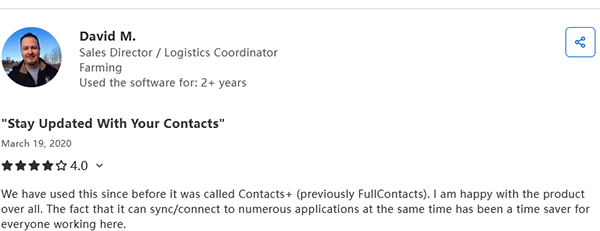
On Capterra, feedback is more divided, as some users value the organization features but others report issues with syncing stability and customer support.
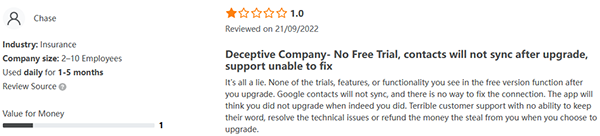
Reviews on SoftwareAdvice often mention frustrations with reliability, though a few users still appreciate the concept of managing all contacts in one place.
A User Review from G2:
A User Review from Capterra:
A User Review from Softwareadvice:6
Part 7. Contacts+: A More Reliable Alternative
Designed for users who want deeper control over their Android data, MobiKin Assistant for Android (Windows/Mac) offers powerful desktop-based management that goes beyond simple syncing. Contacts can be viewed, edited, added, deleted, imported, and exported directly on a computer, giving users far more flexibility than cloud-dependent contact apps.
Local backups ensure contact information stays safe and accessible without relying on an internet connection or third-party servers. With precise contact control and broader device management in one place, it provides a more reliable and efficient experience than the Contacts+ app.
Why Choose MobiKin Assistant for Android?
> All-in-One Data Management: Manage contacts, messages, call logs, media, apps, and documents on a computer.
> One-Click Backup & Restore: Back up and restore Android data, including contacts, easily.
> Selective Data Transfer: Transfer chosen files between Android and PC/Mac via USB or Wi-Fi.
> Advanced Contact Control: Edit, import, export, and sync contacts with Outlook in multiple formats.
> SMS & Call Log Management: View, send, and delete messages and call history from a desktop.
> App & Media Management: Install/uninstall apps and organize files to free up space.
> Windows & Mac/Android Support: Compatible with both major desktop operating systems and 8,000+ Android devices.


After launching MobiKin Assistant for Android on your computer and connecting your Android phone, select "Contacts" from the left-side panel. All contact details stored on your device will then appear on the screen. From there, you can review and manage your contacts directly from the PC by following the clear, step-by-step instructions shown on the main interface.
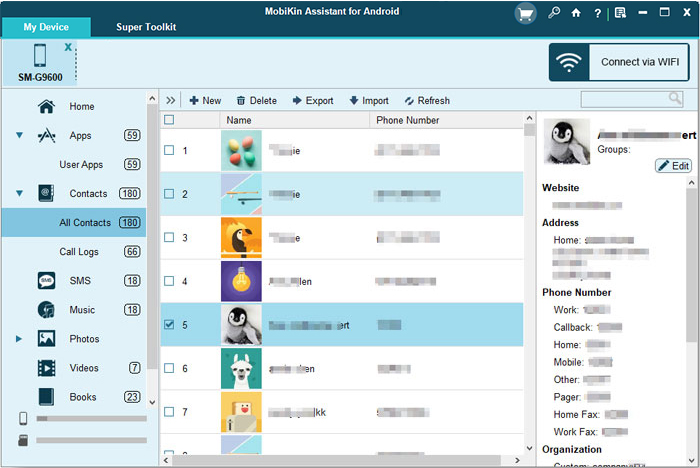
Video Directions - How to Use MobiKin Assistant for Android in a visual manner?
Why MobiKin Assistant for Android is a Good Contacts+ alternative?
- Offline Desktop Control: Manage and back up contacts locally without relying on the cloud.
- More Than Contacts: Handles full Android data, not just contact syncing.
- Flexible Backups: Offers selective and one-click backups for better data protection.
Related Articles:
7 Best Contacts+ Alternatives & Competitors [Worthwhile]
How to Recover Contacts from Android Phone after Factory Reset? 4 Means
8 Most Reliable Methods to Transfer Contacts from Android to Android
How to Transfer Contacts from Android to Outlook? 3 Trusted Methods
