
DT Pro Tool FRP Bypass: Here's All You Want to Know about This Tool
Many Android users turn to professional servicing tools when a device becomes locked after a reset, especially in cases involving Google verification barriers. This passage is mainly about DT Pro Tool FRP bypass and explore whether it really offers advanced repair functions.
By looking into its capabilities and practical use in real repair scenarios, readers can better understand why this tool is frequently discussed among technicians and Android service users.
- Section 1: Key Features of DT Pro Tool
- Section 2: DT Pro Tool: Supported Devices
- Section 3: DT Pro Tool: Pricing & Security
- Section 4: How to Activate DT Pro Tool
- Section 5: How to Bypsss Google FRP Lock via DT Pro Tool
- Section 6: How to Enter Download Mode on Samsung via DT Pro Tool
- Section 7: DT Pro Tool: Pros & Cons
- Section 8: Best Replacement for DT Pro Tool
Section 1: Key Features of DT Pro Tool
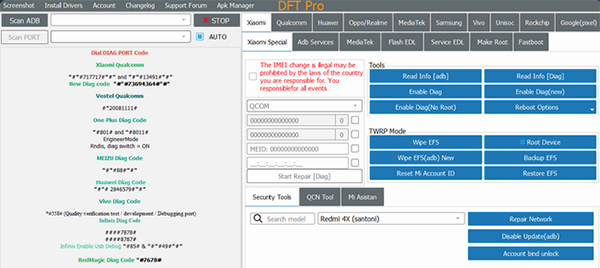
DT Pro Tool is a Windows-based Android servicing tool that supports FRP bypass, screen lock removal, firmware flashing, bootloader operations, and IMEI/EFS repair across Qualcomm and MediaTek devices. It works with major brands using modes such as EDL, BROM, Fastboot, ADB, and Download Mode for advanced device repair and unlocking tasks. Here are the details:
- FRP bypass and Google account lock removal.
- PIN, password, and pattern unlock.
- Firmware flashing and software repair.
- Bootloader unlock and relock.
- Qualcomm and MediaTek (MTK) device support.
- Samsung FRP reset and Download Mode operations.
- EDL, BROM, Fastboot, ADB, and Download Mode support.
- Factory reset and device wipe functions.
- IMEI and EFS repair on supported devices.
- Auth bypass for selected Qualcomm and MTK phones.
- Partition management and security data operations.
- Windows-based technician tool with multi-brand compatibility.
You Might Also Enjoy: UnlockJunky Review: Is UnlockJunky Reliable for FRP Removal?
Section 2: DT Pro Tool: Supported Devices
DT Pro Tool supports a wide range of Android brands and chipsets, making it a versatile solution for professional phone servicing and unlocking tasks. The table below summarizes its main supported devices along with their chipset compatibility and key functions.
|
Brand
|
Chipset Support
|
Main Functions
|
|
Samsung
|
Exynos, Qualcomm |
FRP reset, screen unlock, firmware flashing, and Download Mode operations |
|
Xiaomi/redmi/POCO
|
Qualcomm, MediaTek |
FRP bypass, Mi Account removal, flashing, ADB/EDL servicing |
|
OPPO
|
MediaTek, Qualcomm |
FRP unlock, firmware flashing, system repair |
|
realme
|
MediaTek, Qualcomm |
FRP bypass, software repair, flashing |
|
vivo
|
MediaTek, Qualcomm |
FRP reset, IMEI repair, EDL/BROM servicing |
|
Motorola
|
Qualcomm, MediaTek |
FRP removal, bootloader operations, flashing |
|
Nokia (HMD)
|
Qualcomm |
FRP reset, firmware flashing, EDL mode repair |
|
Huawei
|
Qualcomm |
FRP bypass, downgrade, firmware flashing |
|
TECNO/Infinix
|
MediaTek |
FRP unlock, auth bypass, system repair |
Section 3: DT Pro Tool: Pricing & Security
Pricing:
- DT Pro Tool is not free and requires a paid license to activate and use its full features.
- The typical cost ranges from around $25 to $39 for a basic license, depending on the seller and package type.
- Licenses are usually time-based (monthly or yearly), meaning users must renew after expiration rather than owning a lifetime license.
- Some distributors may offer different activation plans, but pricing varies by region and reseller.
DT Pro Tool is mainly designed for professional technicians, which can make it relatively complex and costly for casual users. In comparison, Android Lock Wiper offers a more user-friendly pricing model that is often more cost-effective for everyday users. Because of its simpler interface and focused unlocking features, it is generally considered a better alternative for users who prioritize affordability over advanced functions.

Security:
- The official version is generally considered safe when downloaded from trusted sources or authorized resellers
- Users are strongly warned to avoid cracked or unofficial versions, which may contain malware, spyware, or unstable files.
- Because DT Pro Tool performs deep system-level operations (FRP, flashing, partitions), improper use can lead to data loss or device bricking.
- It is intended for authorized device repair or personal devices only, as misuse may violate legal or manufacturer restrictions.
- Like most professional flashing tools, it requires caution, correct drivers, and compatible firmware to avoid security or system risks.
Section 4: How to Activate DT Pro Tool
To activate DT Pro Tool, you need to purchase a license from an official seller, install the software on a Windows PC, then log in using the provided email, password, and activation code, and finally confirm activation to link the tool to your device and unlock all features. Below is how:
- First, purchase a DT Pro Tool activation license from an official seller or authorized reseller to receive your activation details.
- After purchase, you will get an activation code (and sometimes login credentials) sent to your email.
- Download and install the DT Pro Manager/DT Pro Tool software on a Windows PC.
- Extract the installation files and run the main launcher or manager as administrator.
- Open the tool and enter your email, password, and activation code in the login/activation section.
- Click "SIGN IN" or "ACTIVATE" to validate the license and link it to your PC.
- Restart the software after login to complete the activation process and unlock full features.
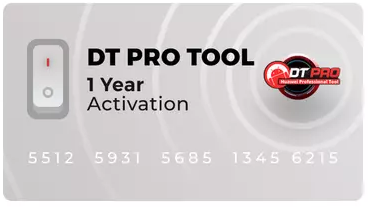
After activation, the tool becomes bound to your computer (with limited transfers depending on the license) and is ready for FRP, flashing, and other servicing functions.
Section 5: How to Bypsss Google FRP Lock via DT Pro Tool
In practice, success depends heavily on the phone model, Android version, and security patch level-newer devices may not support direct FRP removal due to stronger security protections. Here's how:
- First, the phone is prepared by entering a supported connection mode such as Download Mode, Fastboot, or EDL depending on the device.
- The device is then connected to a Windows PC with DT Pro Tool installed and activated.
- In the software, the correct brand and chipset (Samsung, Xiaomi, Qualcomm, MTK, etc.) is selected.
- The tool detects the device and loads the appropriate service module automatically.
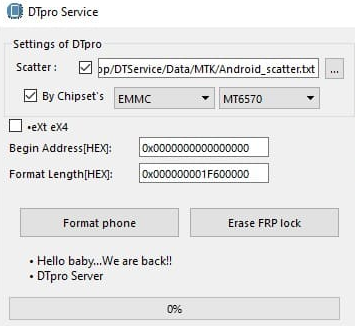
- The user selects the "FRP Reset/Erase FRP" function from the tool interface.
- DT Pro Tool executes system-level commands to remove the Google verification lock.
- After completion, the phone is rebooted and goes through the normal setup screen without FRP verification.
Section 6: How to Enter Download Mode on Samsung via DT Pro Tool
- Install Samsung USB drivers and open DT Pro Tool on your Windows PC.
- Power off the Samsung device completely.
- Prepare the USB cable and connect it to the PC (not yet to the phone).
- Press and hold Volume Up + Volume Down on the phone.
- While holding the buttons, plug the USB cable into the phone.
- The Download Mode warning screen will appear; press Volume Up to confirm.
- Once in Download Mode, DT Pro Tool will automatically detect the device.
- You can then select functions like FRP reset, flashing, or repair inside the tool.
Note: DT Pro Tool itself doesn't directly "force" a Samsung phone into Download Mode in most cases-you usually still need to enter it manually, then let the tool detect and work with the device.
Section 7: DT Pro Tool: Pros & Cons
Advantages:
- Offers multiple advanced functions such as FRP bypass, firmware flashing, IMEI repair, and bootloader unlocking in one tool.
- Works with both Qualcomm and MediaTek devices and supports multiple service modes like EDL, BROM, Fastboot, and Download Mode.
- Designed for technicians, providing deep system-level access for professional device repair and servicing.
Disadvantages:
- Requires a paid license and is not free to use, which may be less convenient for casual users.
- Has a technical interface that can be difficult for beginners without mobile repair experience.
- Limited compatibility in some cases, with not all models or newer Android versions fully supported.
- Mixed user feedback regarding reliability and consistency across different devices.
Section 8: Best Replacement for DT Pro Tool
Android Lock Wiper is an Android unlocking tool that can remove screen locks and bypass FRP on many devices such as Samsung, Xiaomi, Huawei, OPPO, and Motorola with a simple step-by-step process.
It is often considered a more user-friendly alternative to DT Pro Tool because it does not require advanced modes like EDL or BROM. Thanks to its guided interface and broad device support, it is commonly used by non-technical users looking for a simpler unlocking solution.
This product provides fast device detection, multiple unlocking modes, and clear on-screen guidance to simplify the unlocking process for users of different skill levels. It also supports quick processing with high success rates and allows users to set up a new Google account after FRP removal.
How to use the best alternative to DT Pro Tool?
- Start by downloading and installing the tool on your computer.
- After the installation is complete, select "Remove Google Lock (FRP)" and opt for "Advanced Mode."
- Connect your mobile phone to the computer using a USB cable, then click "Start." (You can back up your device to avoid any possible data loss during the FRP bypass procedure.)
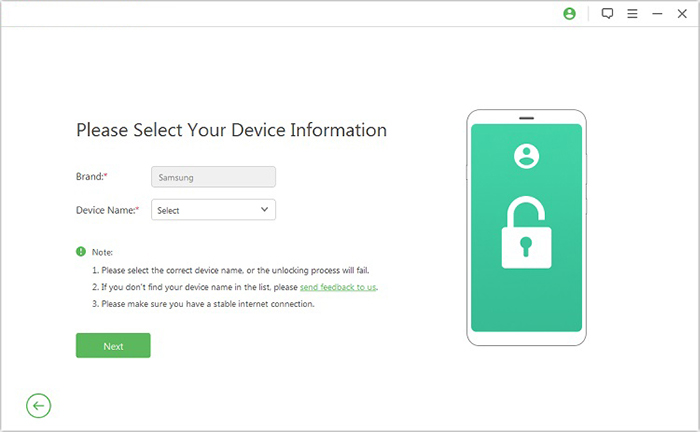
- Proceed by following the prompts to input the required information about your Android device and click "Next."
- Adhere to the on-screen instructions to enter recovery mode on your device.
- On the next screen, choose the correct PDA, country, and carrier, then click "Download" to retrieve the necessary data package.
- Subsequently, click "Start to Extract," and follow the on-screen instructions to put your device into
- Download Mode, enable USB debugging, activate OEM unlock, and extract the firmware, along with other essential tasks.
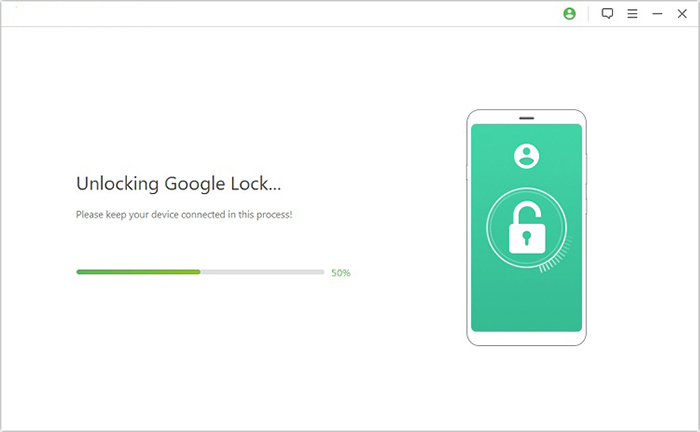
- Ultimately, the software will initiate the unlocking of FRP on your cell phone.
FAQs about DT Pro Tool FRP Bypass
Q1. Is DT Pro Tool easy for beginners?
Not really. It is mainly designed for professional technicians and requires some technical knowledge.
Q2. Can DT Pro Tool damage my phone?
Improper use or wrong firmware selection can lead to software issues or device bricking.
Q3. Is DT Pro Tool safe to download?
The official version is generally safe, but unofficial or cracked versions may contain malware or unstable files.
Q4. What should I do if FRP bypass fails?
You may need to check device compatibility, update drivers, or use an alternative unlocking tool or official Google account recovery methods.
Q5. What advantages does Android Lock Wiper have over DT Pro Tool besides cost-effectiveness?
Android Lock Wiper offers a simpler, more user-friendly interface compared to DT Pro Tool, making it easier for non-technical users to remove screen locks and FRP without advanced repair knowledge. It also provides guided step-by-step processes that reduce the risk of errors or device damage during unlocking.
In addition, it focuses on quick lock removal functions without requiring complex modes like EDL or BROM, making it more convenient for everyday users.
Related Articles:
Easy Samsung FRP Tool Installing Drivers Failed? Reasons & 9 Fixes
7 Methods to Activate and Use An iPhone without SIM Card
5 Tactics to Recover Formatted Data from Android Phone with/without Backup
Android Remote Control: 5 Ways to Remotely Control Android Phone
