
Samsung FRP Helper v0.2 Review: Complete & Insightful Explanation
For many Samsung users, being locked out of a device after they forget Google credentials after a factory reset can be frustrating and time-sensitive. In such situations, tools like Samsung FRP Helper v0.2 are often mentioned. This Samsung FRP Helper v0.2 review takes a closer look at what the tool can actually do today, rather than what older tutorials claim.
Within this article, you will find a clear how-to guide, along with a balanced breakdown of its pros, cons, FAQs, and alternative solutions.
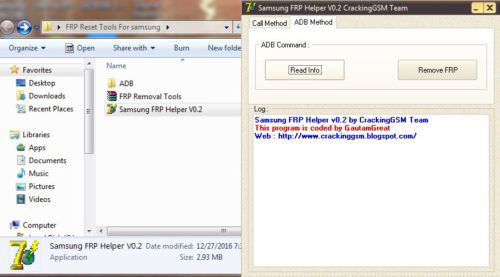
Part 1: What Is Samsung FRP Helper v0.2? Why It Fails
Overview:
Samsung FRP Helper v0.2 is a free Windows-based tool developed to help users bypass the Factory Reset Protection (FRP) lock on Samsung devices. It mainly works by using ADB (Android Debug Bridge) or a call-based method to access system settings and remove the Google account verification after a reset.
- It includes features like COM port detection, device scanning, ADB commands, and FRP removal.
- It was originally created for older Samsung phones and earlier Android versions.
Reasons Why It Doesn't Work:
- Outdated and no longer supported, making it incompatible with modern devices and systems.
- Only works on old Android versions (Android 5-7.1.1), so it fails on most current Samsung phones.
- Relies on a patched security loophole, which has been blocked since Android 7 (Nougat).
- Requires USB debugging, which is usually disabled on FRP-locked devices.
- Fails to detect devices, causing issues like unrecognized phones, unresponsive buttons, or failed commands.
- High security risks due to unsafe or unofficial download sources that may contain malware or spyware.
- Low success rate with unstable performance and a complex process for beginners.
You Might Also Like: 11 Best FRP Bypass Tools to Remove Google Account on Android
Part 2: How to Use Samsung FRP Helper v0.2
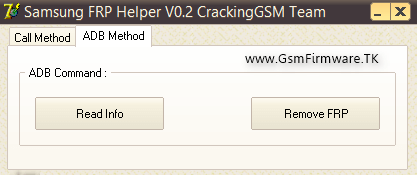
Option 1: ADB Method (Recommended)
- Download & run the tool - Extract the file and open it as Administrator.
- Enable USB debugging - Use OTG/mouse or combination firmware to access Developer Options.
- Connect phone to PC - Use a USB cable.
- Select "ADB Method" - Choose it from the tool interface.
- Click "Read Info" - Let the tool detect device details.
- Click "Remove FRP" - The tool attempts to bypass the lock.
- Wait for reboot - Device restarts after FRP removal.
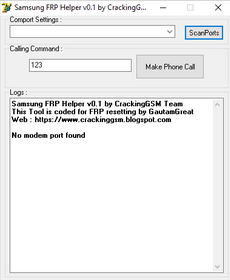
Option 2: Call Method
- Launch the program - Run Samsung FRP Helper v0.2 on your PC.
- Connect your phone - Plug it in while on the FRP lock screen.
- Click "Call Method" - Choose this option in the tool.
- Scan for device port - Click "Scan" and select the correct COM port.
- Enter a phone number - Input any number in the field.
- Click "Call Now" - Initiates a call on the locked device.
- Proceed with bypass steps - Use the opened interface to access settings.
The ADB method is generally more reliable, provided USB debugging is enabled on the device. The Call method is easier to perform and requires fewer steps. However, it tends to be less stable and may not work consistently across devices.
Part 3: FAQs about Samsung FRP Helper v0.2
Q1. Does Samsung FRP Helper v0.2 still work in 2025 - 2026?
No, it is largely outdated and ineffective on modern devices because newer Android versions block its method.
Q2. Why doesn't it work on newer Android versions?
It relied on an ADB security loophole, which was patched starting from Android 7 updates, preventing access before unlocking.
Q3. Is Samsung FRP Helper v0.2 safe to download?
Not really. Many downloads are unofficial and may contain malware, spyware, or adware.
Q4. Is it easy to use for beginners?
No, it's considered tricky and not beginner-friendly, especially compared to modern FRP tools.
Q5. What problems might users encounter when using it?
- Device not detected - The tool often fails to recognize connected Samsung phones.
- ADB connection issues - Requires USB debugging, which is usually inaccessible on FRP-locked devices.
- Patched security loopholes - Newer Android updates block the exploit the tool relies on.
- Limited Android compatibility - Only works on Android 5-7.1.1, failing on newer versions.
- Buttons not responding - Features like "Remove FRP" may not function properly.
- Frequent crashes or freezes - The outdated tool can be unstable during operation.
- Complicated steps - Not beginner-friendly and requires technical knowledge.
- No updates or support - The tool is abandoned, with no official fixes available.
- Low success rate - Even on supported devices, bypass attempts may fail.
- Security risks - Downloads from unofficial sources may include malware or adware.
Q6. What if Samsung FRP Helper v0.2 doesn't work?
- Try a modern FRP bypass tool - Use updated software that supports newer Android versions.
- Use Samsung Smart Switch - In some cases, it can help regain access during setup.
- Use "Forgot Email/Password" - Recover your Google account via official recovery options.
- Enter correct Google credentials - Log in with the previously synced account.
- Use TalkBack method - Access settings through accessibility tricks (works on some versions).
- Try APK bypass methods - Install FRP bypass APKs via OTG or browser (older devices only).
- Use ADB (if enabled) - Remove FRP via command line if debugging was previously on.
- Contact Samsung Support - Provide proof of purchase for official unlocking help.
- Visit a service center - Professionals may help remove FRP safely.
- Avoid outdated tools - Don't rely on unsupported software like v0.2 anymore.
Part 4: Samsung FRP Helper v0.2: Pros and Cons
Before deciding whether to use Samsung FRP Helper v0.2, it's important to understand what it can and cannot do. The following pros and cons highlight its strengths as well as the limitations that may affect its performance on modern devices:
Pros of Samsung FRP Helper v0.2:
- Free to use with no cost involved.
- Simple interface, suitable for basic users.
- Lightweight program that runs smoothly on most PCs.
- Can bypass FRP on older Samsung devices using ADB or call methods.
Cons of Samsung FRP Helper v0.2:
- Limited compatibility, mainly works on older Android versions (up to Android 7.1.1).
- No longer updated or officially supported.
- Requires USB debugging, which is rarely enabled on locked devices.
- Tricky to use and not beginner-friendly in real scenarios.
- Risk of device issues if used incorrectly.
- Potential security risks when downloading from unofficial sources.
Part 5: A More Reliable Alternative to Samsung FRP Helper v0.2
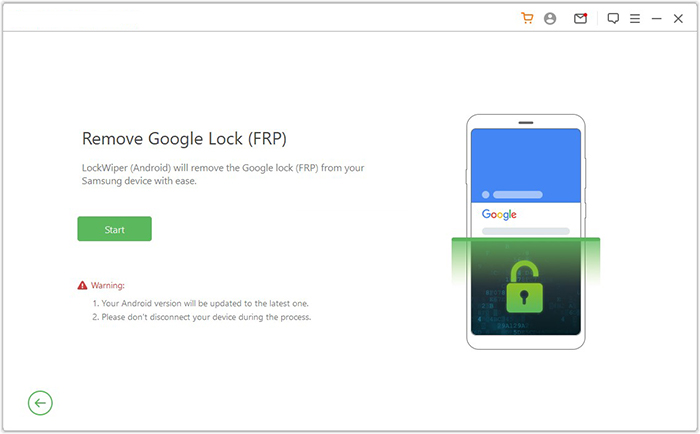
Built to handle modern Android security, Android Lock Wiper serves as a practical replacement for Samsung FRP Helper v0.2. It works across newer system versions and recent Samsung models where older tools usually fail. The process is more straightforward, reducing the technical barriers often seen with legacy methods. As a result, users can remove FRP locks with greater consistency on up-to-date devices.

This tool supports FRP bypass, screen lock removal (PIN, pattern, password, fingerprint, face), and works across major Android brands like Samsung, Xiaomi, Huawei, and Motorola, with no data loss on selected Samsung devices. Regular updates, a high success rate, data protection options, and an easy step-by-step interface make it a safer and more reliable alternative to outdated tools like Samsung FRP Helper v0.2.
How to use the best Samsung FRP Helper v0.2 alternative?
- Begin by downloading and installing the software on your computer.
- After the installation is finished, select "Remove Google Lock (FRP)" and choose "Advanced Mode."
- Connect your smartphone to the computer using a USB cable, then click "Start."
- Follow the instructions to enter the necessary information regarding your smartphone and click "Next."
- Follow the on-screen instructions to access recovery mode on your device.
- On the subsequent screen, select the appropriate PDA, country, and carrier, then click "Download" to obtain the required data package.
- Next, click "Start to Extract," and adhere to the on-screen instructions to place your device into Download Mode.
- Enable USB debugging, turn on OEM unlock, and extract the firmware along with other critical tasks.
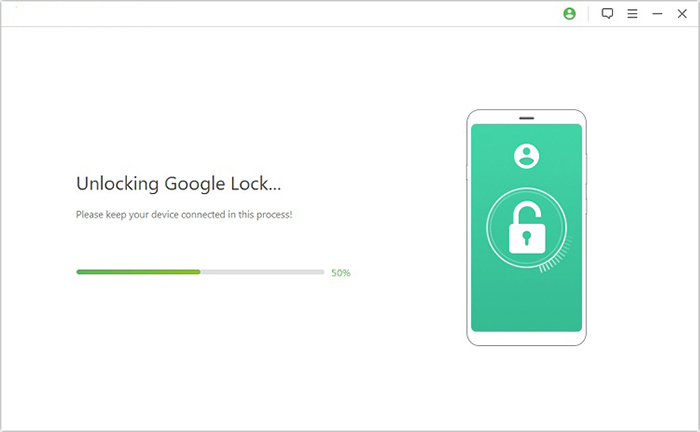
- Finally, the software will commence the FRP unlocking process for your smartphone.
In Conclusion
Samsung FRP Helper v0.2 belongs to a different phase of Android unlocking - one where older system gaps made simple tools effective. Today, those gaps are mostly closed, and using such software can feel like forcing an old key into a new lock. For a clearer perspective, here's a side-by-side comparison with a more current solution:
|
Feature
|
Android Lock Wiper
|
Samsung FRP Helper v0.2
|
|
Android Support
|
Newer versions (incl. recent updates) |
Android 5-7.1.1 only |
|
Compatibility
|
Works with modern Samsung models |
Limited to older devices |
|
Ease of Use
|
Guided steps, simpler workflow |
Manual steps, more complex |
|
Success Rate
|
More consistent results |
Often unreliable |
|
Updates
|
Actively maintained |
No longer updated |
|
Safety
|
Cleaner installation sources |
Risk from unofficial downloads |
Related Articles:
Samsung Contacts Disappeared? 10 Troubleshooting Tips You Wish You'd Known
5 Verified Ways: How to Recover Data after Factory Reset on Samsung
How to Recover Data from Phone That Won't Turn on? Solved with 4 Solutions
How to Transfer Data from Old to New Samsung? 7 Widely-used Means
