
Apeaksoft iOS Unlocker Reviews: Is It Worth Investing in?
Before choosing any iPhone unlocking tool, it is important to understand how it performs in real situations rather than relying only on product claims.
Checking Apeaksoft iOS Unlocker reviews helps users avoid risks such as unexpected data loss, high subscription costs, or tools that may not work well on certain iOS versions or devices, while also comparing options like the Apeaksoft iOS Unlocker and 1 best replacement for better decision-making.
- Part 1: Apeaksoft iOS Unlocker: Overview
- Part 2: Apeaksoft iOS Unlocker: Core Features
- Part 3: Apeaksoft iOS Unlocker: Pricing & Security
- Part 4: Apeaksoft iOS Unlocker: How-tos
- Part 5: Apeaksoft iOS Unlocker: Merits & Demerits
- Part 6: Apeaksoft iOS Unlocker: What Could Be Better?
- Part 7: Apeaksoft iOS Unlocker vs iOS Lock Wiper - Full Comparison
Part 1: Apeaksoft iOS Unlocker: Overview
Apeaksoft iOS Unlocker is a desktop tool that removes screen locks, Apple ID, Screen Time passcodes, and MDM restrictions from iOS devices. It is commonly used when users forget passwords or need to access a second-hand iPhone that is locked. The software is easy to use on Windows and Mac, but full features require a paid version.
Part 2: Apeaksoft iOS Unlocker: Core Features
When you're locked out of an iPhone or dealing with account-related restrictions, understanding what a tool can actually do becomes essential. The table below outlines the key features of Apeaksoft iOS Unlocker to help you quickly assess its capabilities:
|
Feature
|
Description
|
|
Unlock Screen Passcode |
Removes 4/6-digit passcodes, Touch ID, and Face ID locks to access the device again. |
|
Remove Apple ID |
Deletes Apple ID without a password, allowing users to sign in with a new account. |
|
Bypass Screen Time Passcode |
Clears Screen Time restrictions or recovers the passcode without hassle. |
|
Remove MDM Lock |
Eliminates Mobile Device Management (MDM) restrictions from iPhone/iPad. |
|
Wipe iTunes Backup Password |
Removes encryption passwords from iTunes backups for easier data access. |
|
Works in Multiple Scenarios |
Handles forgotten passwords, disabled devices, broken screens, second-hand devices, or malfunctioning biometrics. |
|
Wide Compatibility |
Supports many iOS versions and devices, including iPhone, iPad, and iPod Touch. |
|
Simple Operation |
Offers an intuitive interface with step-by-step unlocking processes suitable for beginners. |
Part 3: Apeaksoft iOS Unlocker: Pricing & Security
Pricing
- Monthly license costs about $39.92, while a lifetime license is around $59.96 with full feature access.
- A free trial is available, but it only detects devices and cannot perform actual unlocking unless upgraded.
- Plans typically include money-back guarantees (7-30 days) and support for limited or multiple devices depending on the license.
Security
- The software claims to use 256-bit SSL encryption to protect payments and user data.
- It is generally considered safe to use, though outcomes depend on the unlocking type and proper usage.
- Some features (like removing passcodes or Apple ID) may erase device data, so caution is required before proceeding.
Part 4: Apeaksoft iOS Unlocker: How-tos
Using Apeaksoft iOS Unlocker doesn't require advanced technical skills, but following the correct sequence is important to avoid errors. The steps below outline the general process to help you unlock your device smoothly:
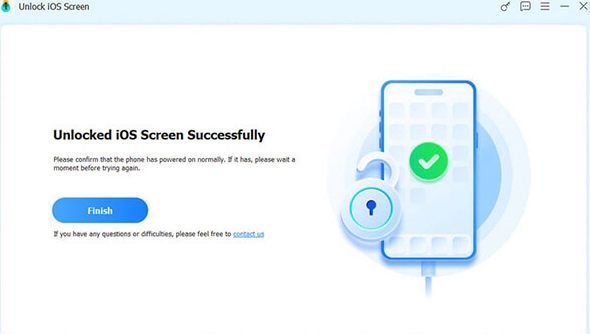
- Obtain the Apeaksoft iOS Unlocker software from the official website and open the application on your desktop.
- Choose the Unlock iOS Screen mode from the main dashboard and connect your iPhone using an original Apple lightning or USB-C cable.
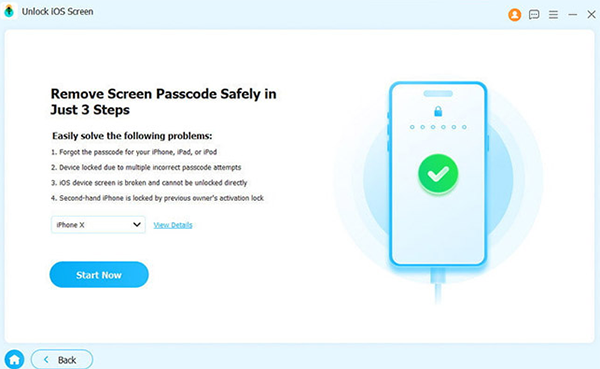
- Verify the information of your iOS device and then click the Start Now button to continue. The tool will begin downloading the Firmware Package. Follow the instructions to proceed.
- Once the firmware package has been downloaded, the unlocking process will commence automatically. The process will be completed shortly.
Part 5: Apeaksoft iOS Unlocker: Merits & Demerits
The Good:
- Simple and user-friendly interface, making it suitable for beginners without technical knowledge.
- Supports multiple unlocking functions, including screen passcode, Apple ID, Screen Time, and MDM removal.
- High success rate for common passcode unlocking and fast firmware download speed.
- Works across many iOS devices and versions on both Windows and macOS.
- Helpful in various scenarios like forgotten passwords, disabled devices, or second-hand iPhones.
The Bad:
- The free trial is very limited and cannot perform actual unlocking without payment.
- Subscription cost is relatively high compared to some alternatives.
- Certain unlocking processes may erase all data on the device.
- Effectiveness may vary depending on device status and unlocking type.
- Some user feedback mentions dissatisfaction with value or results in specific cases.
Part 6: Apeaksoft iOS Unlocker: What Could Be Better?
iOS Lock Wiper is a desktop unlocking tool that helps remove iPhone screen passcodes, Apple ID, Screen Time locks, and MDM restrictions when users are locked out of their devices. It is widely recognized as a strong alternative to Apeaksoft iOS Unlocker because it offers similar unlocking functions with a relatively simple step-by-step process and broad iOS compatibility.
Many guides and reviews note that both tools target the same scenarios, but iOS Lock Wiper is often promoted for its higher success rate and more flexible unlocking options.
Main Features of iOS Lock Wiper:
- Screen passcode removal - Unlocks 4/6-digit codes, Face ID, and Touch ID.
- Apple ID removal - Removes Apple ID so a new account can be used.
- Screen Time removal - Clears Screen Time passcodes without password.
- MDM bypass - Removes Mobile Device Management restrictions.
- Activation lock help - Bypasses activation lock in limited cases.
- Wide compatibility - Supports many iPhones, iPads, and iOS versions (The latest iPhone 17 series included).
- Fast unlocking process - Removes device locks in a few simple steps with quick firmware handling.
- Broad scenario support - Works for disabled devices, broken screens, failed Face/Touch ID, and second-hand iPhones.


How to use the best Apeaksoft iOS Unlocker alternative - iOS Lock Wiper (Take screen unlocking as an example)?
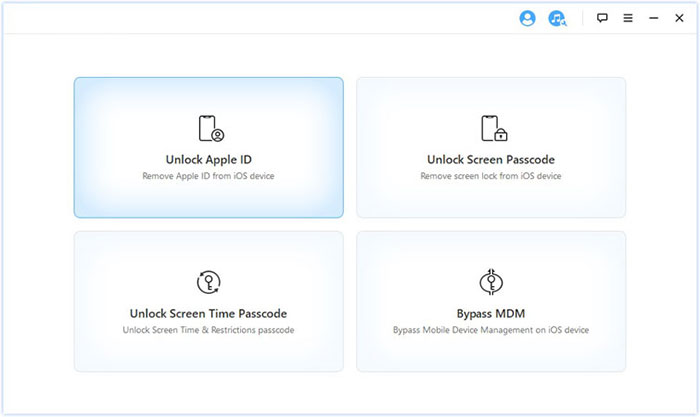
- Download and install iOS Lock Wiper, open the program, and select "Unlock Screen Passcode" mode from the main interface.
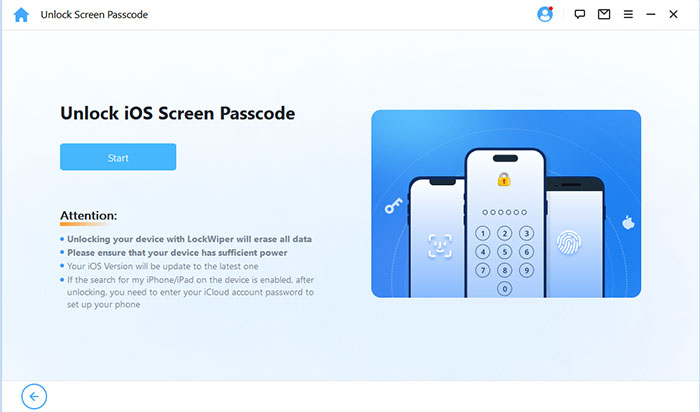
- Connect your iPhone to the computer using a USB cable, then click Start so the software can detect your device.
- Check and confirm your device details; if needed, follow the on-screen instructions to enter Recovery Mode or DFU Mode for proper detection.
- Download the matching firmware package provided by the tool and wait until the verification is complete.
- Enter the required confirmation code (usually "000000") and click Unlock to begin removing the screen lock.
- Keep the device connected during the process; once finished, your iPhone will restart without the passcode and can be set up again.
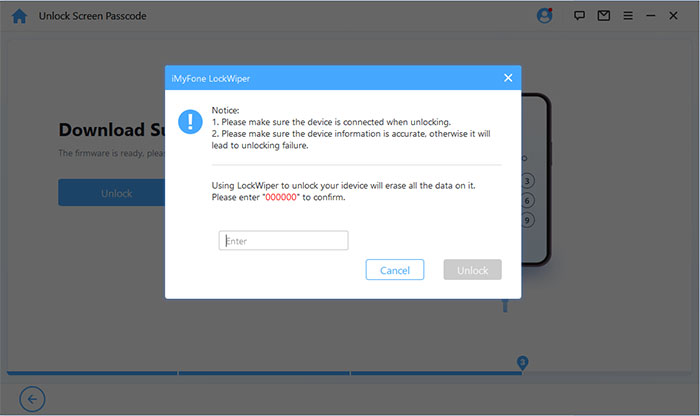
Part 7: Apeaksoft iOS Unlocker vs. iOS Lock Wiper - Full Comparison
Choosing between iPhone unlocking tools often depends on how broad their features are and how well they handle different lock scenarios. The table below compares Apeaksoft iOS Unlocker and iOS Lock Wiper in a comprehensive manner.
|
Attribute
|
Apeaksoft iOS Unlocker
|
iOS Lock Wiper
|
|
Screen passcode removal
|
Removes basic screen locks |
Removes passcode with broader scenario support (disabled, Face ID/Touch ID failures, etc.) |
|
Apple ID removal
|
Supported |
Stronger Apple ID bypass focus with more guided workflows |
|
Screen Time unlock
|
Supported |
Fully integrated and widely highlighted feature |
|
MDM removal
|
Supported |
More established MDM bypass feature set |
|
Success rate (reported)
|
Generally stable |
Often reported as higher in difficult lock scenarios |
|
Device compatibility
|
Wide iOS device support |
Very broad iOS + older/newer device handling |
|
Scenario coverage
|
Standard lock removal cases |
Wider coverage (disabled iPhone, second-hand devices, failed biometrics) |
|
Extra features
|
Includes iTunes backup password removal |
Focused more on unlocking ecosystem tools rather than backup decryption |
|
Pricing model
|
One-time/subscription plans |
Similar pricing, but often more tiered packages |
Summary: As can be concluded from the above, iOS Lock Wiper generally stands out with broader scenario coverage, stronger Apple ID/MDM focus, and more "all-in-one" unlocking workflows, while Apeaksoft iOS Unlocker is simpler but slightly less feature-expansive. So, give it a download for a pleasant trial.
Related Articles:
Apeaksoft Android Data Recovery Review: Is It Advisable? [Fixed]
Apeaksoft iPhone Data Recovery Review: Is Apeaksoft Worth Buying?
Apeaksoft Phone Mirror Review: Does It Justify the Cost? [Full Analysis]
8 Most Desirable Android Phone Unlocking Software [Must-Read]
