Is HushSMS FRP APK Safe to Download & Try Out? Expert Tips
TL;DR:
HushSMS has gained attention among users searching for a free way to handle FRP, but its usefulness depends heavily on the phone model, Android version, and security patch. For a smoother experience, checking the device's official account-recovery options or using a reputable unlocking tool - Android Lock Wiper may be a better choice.
Disclaimer: We advocate for the use of the unlocking products mentioned in this article strictly within legal boundaries and expressly forbid their utilization for unauthorized activities.
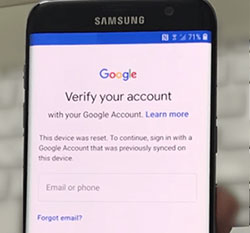
Factory Reset Protection (FRP) can become a hurdle when an Android phone is reset and the previously linked Google account cannot be verified. Users whose usual FRP methods do not work may turn to HushSMS as another option, especially when dealing with older Samsung models and SMS-based FRP techniques.
In this article, we will examine the HushSMS FRP APK, including how it works, its compatibility, safety concerns, advantages and drawbacks, and a more trusted alternative worth considering.
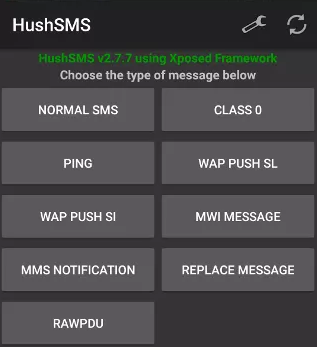
Section 1: Overview of HushSMS FRP APK
HushSMS FRP APK is a tool designed to bypass the Google Factory Reset Protection (FRP) lock on Android devices, particularly Samsung smartphones. (Note: HushSMS itself does not independently remove FRP. The reported method uses the push SMS to reach browser-related functions and then relies on additional APKs and steps to complete the FRP bypass.)
This method is mainly effective on older Samsung models running Android 5.0 to 9.0 (such as Galaxy S9 Plus, S8 Plus, S7 Edge, Note 9, Note 8) and is offered as a free solution.
People Also Like: Direct Open FRP MobileTech Review: Is This Tool Now Obsolete?
Section 2: Core Features of HushSMS FRP APK
HushSMS FRP APK uses SMS-based functions to help access certain settings and services on supported FRP-locked Samsung devices. The table below summarizes its main features, compatibility, and key functions.
|
Feature
|
Details
|
|
FRP Unlock for Samsung |
Helps bypass Google account verification/FRP locks on supported Samsung devices, particularly older models. |
|
Push SMS Function |
Sends special WAP Push SMS messages to an FRP-locked phone, which can open a browser or related service from the verification screen. |
|
SMS-Based Operation |
Uses specific SMS commands rather than requiring a PC for the HushSMS portion of the process. |
|
Support for Older Samsung Models |
Reported to work with compatibility depending on Android version and device configuration. |
|
Free to Use |
The HushSMS FRP method is presented as a free solution. |
|
No PC Required |
The HushSMS process can be carried out using another accessible Android phone and the required SIM setup rather than a computer. |
|
Android Compatibility |
Appgeeker reports the FRP method mainly for Android 5 through Android 9, while newer Samsung versions may not work reliably. |
|
Simple SMS Interface |
Provides options such as WAP PUSH SL for sending the required push message, making the main SMS-sending function relatively straightforward. |
You Might Also Enjoy: iCloud DNS Bypass Full Guide: Unlock iPhone/iPad Activation Lock
Section 3: How to Download and Use HushSMS FRP APK
To successfully bypass FRP using HushSMS, you will first need to prepare two Android devices and two active SIM cards, as the entire process relies on sending a push notification via SMS from one device to the other.
Once the prerequisites are met, the core procedure involves downloading the APK onto a secondary device, sending a crafted Wap Push to the locked phone, and then exploiting the browser to install a Google Account Manager that allows you to log in with a new account and complete the setup. (NOTE: The app is designed for GSM networks and does not function on CDMA networks.) Here's how:
Step 1: Download the HushSMS APK
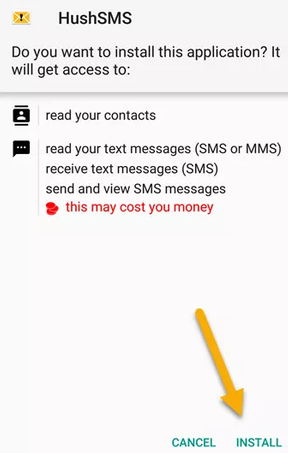
- HushSMS is not available on the Google Play Store and has no official website. You will need to download it from third-party sources like APKCombo or Android File Host.
- On your unlocked Android device, open a browser and go to a trusted third-party APK site (such as those listed above).
- Search for HushSMS APK and download the latest version available.
- Once the download is complete, install the APK on the unlocked device.
Step 2: Prepare the Locked Device
- Turn on the FRP-locked Samsung device and connect it to a WiFi network.
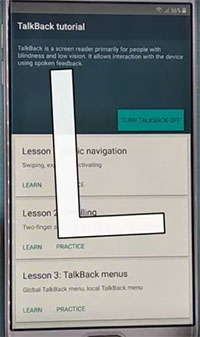
- When you reach the Google account verification screen, check if the TalkBack option is working by pressing two fingers on the screen.
- Insert the SIM card without a PIN lock into this locked device.
Step 3: Use HushSMS to Send the Push Message
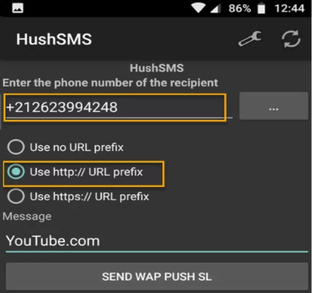
- On the unlocked Android device, open the installed HushSMS app.
- From the app menu, select "Wap Push SL" (or "WPA PUSH SL").
- In the top field, enter the phone number of the FRP-locked Samsung device.
- In the URL field, enter youtube.com (or another trusted URL).
- Tap the "SEND WPA PUSH SL" button to send the push SMS to the locked device.
Step 4: Bypass FRP on the Locked Device
- On the locked Samsung device, you should receive a push notification. Tap "OK"- the YouTube page (or the URL you entered) will open.
- From the YouTube page, tap "Terms & Privacy" (or similar). The internet browser will open automatically.
- In the browser, select "Accept" and then "No thanks" to proceed.
- Now, download and install a Google Account Manager APK.
- Go to Settings on the locked device and grant the necessary permissions to install the APK.
- Once the Google Account Manager is installed, you should be able to add a new Google account and complete the setup, thereby bypassing the FRP lock.
Section 4: Pros and Cons of HushSMS FRP APK
The Good:
- Free to use. The HushSMS APK is available for free to all users.
- No computer required. The bypass process can be completed directly on the device without needing a PC or an OTG cable.
- Effective on specific older Samsung devices. It works well for bypassing FRP on certain Samsung models, particularly older ones.
- Compatible with Android 5.0 to 9.0. The tool is effective for devices running Android versions from Lollipop to Pie.
The Bad:
- Not user-friendly. The procedure is complicated and challenging to follow, especially for beginners.
- Limited device compatibility. It is primarily designed for Samsung devices and may not work on other Android brands. Furthermore, its effectiveness is not verified on many devices, and it is known not to work on newer Android versions (10 and above).
- Potential for misuse. As a tool that can bypass security measures, using HushSMS on devices you do not own may violate terms of service and local laws.
- Network limitation. The app is designed for GSM networks and will not function on CDMA networks.
Section 5: What Could Be Better than HushSMS FRP APK
For users looking for a more straightforward FRP solution, Android Lock Wiper can serve as a useful alternative to HushSMS FRP APK. It supports removing Google FRP locks on various Android devices and offers a guided process without relying on SMS-based tricks. Its broader device support also makes it worth considering when HushSMS does not work on a particular phone.
Core Features of Android Lock Wiper:
> Google FRP Bypass - Compatible with a wide range of supported Android devices, extending beyond just Samsung models.
> Data-Safe Unlock for Samsung - Directly removes Galaxy screen locks without compromising or erasing any personal data.
> Comprehensive Lock Removal - Eliminates all common screen locks, including PINs, passwords, patterns, and biometric options (fingerprint/face).
> FRP Account Removal - Effectively bypasses Google account verification on all compatible devices.
> User-Friendly Operation - Features a clear, step-by-step guided process for hassle-free unlocking.
> No Password Required - Enables FRP bypass on supported models even when the previous Google account password is unknown or forgotten.
> Wide Android Brand Support - Works with various devices from brands such as Samsung, Xiaomi, Redmi, OPPO, vivo, Huawei, and Motorola.
> Android Version Compatibility - Supports a range of Android versions, allowing users with different system versions to find a suitable unlocking option.
Below is how to bypass Google FRP on Android device via the HushSMS FRP APK alternative:
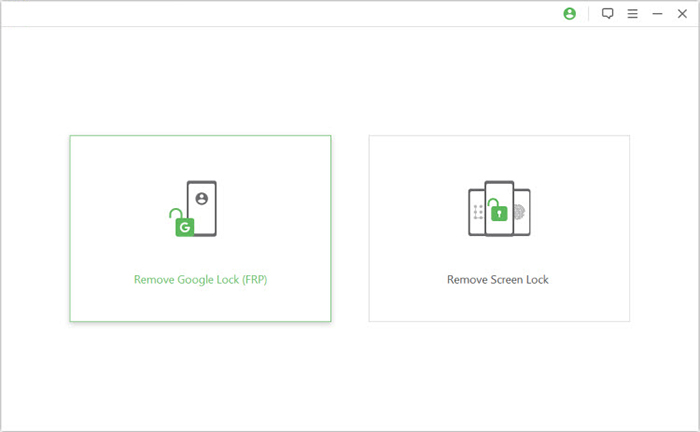
Step 1. Install the Unlocking Tool
- Download and install the FRP unlocking software from a reliable source.
- Open the program and choose Remove Google Lock (FRP) in Advanced Mode.

Step 2. Connect the Android Phone
- Connect your Android phone to the computer with a USB cable.
- Select Start to begin, and install the required device USB drivers if the phone is not detected.
Step 3. Complete the FRP Removal
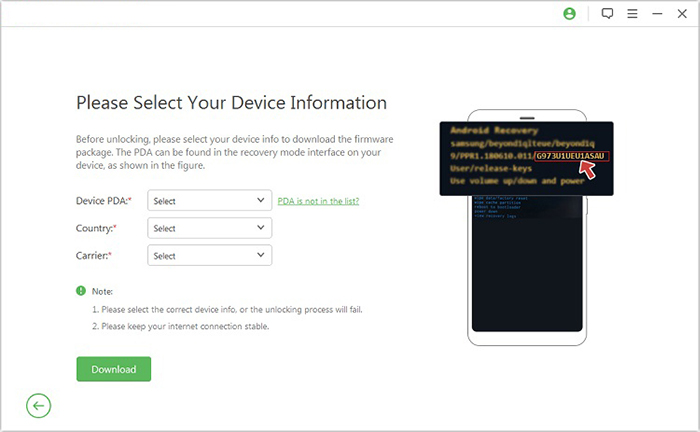
- Follow the on-screen instructions to enter Recovery Mode and enter your device details, such as PDA, country, and carrier.
- Download the required data package, select Start to Extract, and follow the prompts for USB debugging and OEM unlocking. Once the process finishes, restart the smartphone to complete the FRP removal.
FAQs about HushSMS FRP APK
Q1. Do I need two SIM cards to use HushSMS?
According to the cited guide, the process may require two active SIM cards, along with a secondary Android phone and a Wi-Fi connection.
Q2. Why does HushSMS fail to send WAP Push messages?
Possible reasons include carrier restrictions, incompatible network support, or Android security restrictions on specialized SMS messages.
Q3. Why does the locked phone receive the message but not respond?
The device may receive the message but block the action because its Android version or security measures no longer support the underlying method..
Q4. Is HushSMS FRP bypass guaranteed to work?
No. Results can vary according to the device, Android version, carrier, network, and security updates.
Q5. Is HushSMS FRP safe?
HushSMS FRP may work on some older Samsung phones, but its effectiveness is limited on newer Android versions. Downloading the APK from unofficial third-party websites can pose security risks because the file may be modified or bundled with unwanted software. Therefore, use HushSMS with caution and only download it from a trustworthy source.
Q6. What can I do if HushSMS does not work?
For a device you own or are authorized to unlock, use the Google account previously associated with the phone or the manufacturer's official account-recovery process. For older devices where those options are unavailable, a reputable repair/unlock service may be preferable to downloading untrusted APKs.
Related Articles:
How to Screen Mirror without WiFi? 5 Most Admirable Methods 2026
Android 17 Update: Tips, Features, Update Methods, and More
MotoReaper Motorola FRP Tool Review: Does It Really Work? Answered
How to Recover Data after Factory Reset Android? 5 Ingenious Ways