
RootJunky FRP Bypass Review 2026: Has It Really Been Phased Out?
RootJunky Shows Off Just How Easy It Is To Bypass The Factory Reset Protection On Samsung Phones Due To A Flaw In Their Software. Any RootJunky FRP Bypass Review? -- from Reddit
For a full breakdown of RootJunky's performance, you can continue reading the main section below. If you are mainly looking for a stronger alternative, it's helpful to first review the detailed feature comparison with a better option presented in the table.
|
Feature
|
RootJunky FRP Bypass
|
Android Lock Wiper
|
|
Type of tool
|
Free exploit-based APK method |
|
|
Success rate
|
Low on modern devices due to patched vulnerabilities |
Higher success rate with updated unlocking methods |
|
Ease of use
|
Requires technical steps (OTG, APK install, hidden settings) |
Simple guided process with on-screen instructions |
|
Security
|
Risky due to unofficial APK files and malware exposure |
Safer, official software with controlled installation |
|
Updates & support
|
Mainly older Android (5.0-8.1), limited device support |
Wide compatibility across many Android brands and newer versions |
|
FRP bypass ability
|
Works only on older loopholes, often blocked now |
Designed to handle modern FRP protections more effectively |
|
Reliability
|
Inconsistent and outdated |
Stable and more dependable for current Android systems |
Part 1: What Is RootJunky FRP Bypass
RootJunky FRP Bypass is a free Android tool used to bypass Google's Factory Reset Protection (FRP) lock on certain devices, especially older Samsung models. This tool works by taking advantage of system vulnerabilities in the Android setup process to skip the verification step. Instead of removing the lock directly, it allows users to enter the device and add a new account.
The tool was widely used on Android versions from 5.0 to around 8.1, where such loopholes were more common. However, most of these methods have been patched in newer Android updates, making RootJunky far less effective today. As a result, it is now considered an outdated workaround rather than a dependable solution for modern devices.

You May Also Like: UnlockJunky Review: Is UnlockJunky Reliable for FRP Removal?
Part 2: RootJunky FRP Bypass: Pricing & Security
RootJunky FRP Bypass is free but comes with trade-offs-mainly security risks and low success rates on modern devices. While it once worked well on older Android systems, today it's often considered unsafe and outdated compared to maintained tools. Here are the details:
|
Aspect
|
Details
|
|
Pricing |
Completely free to download and use, with no subscription, license, or activation fees required |
|
Hidden Costs |
No official charges, but potential indirect costs (e.g., device damage, failed attempts, or need for alternative tools) (Want to recover data from a broken phone?) |
|
Official Distribution |
Not available on trusted platforms like Google Play; mainly shared via third-party websites |
|
Security Level |
Low - lacks official verification or security review, increasing potential risks |
|
Malware Risk |
High risk of malware, spyware, or modified APKs due to unofficial sources |
|
Privacy Concerns |
Possible exposure of personal data through unsafe or repackaged files |
|
Reliability |
Decreasing reliability; many methods fail on newer Android versions due to patched vulnerabilities |
|
Legal/Safety Considerations |
May violate device policies or local regulations if used improperly |
Part 3: RootJunky FRP Bypass: How to Use
Key Considerations:
- Device compatibility is limited, especially on newer Android versions.
- Security risks may arise due to exploiting system vulnerabilities.
- APK files from unofficial sources can contain malware.
- Possible data loss during or after the bypass process.
- Low success rate on updated or patched devices.
- Requires technical steps that may be difficult for beginners.
- No official support or regular updates available.
- May violate device policies or usage regulations in some cases.
Quick Steps:
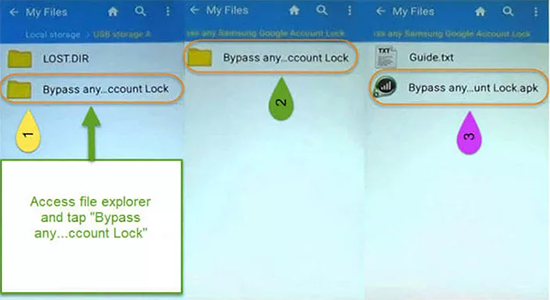
- Download the RootJunky APK - Visit the official RootJunky site and download the com.rootjunky.frpbypass APK to your phone or transfer it via SD card/USB OTG.
- Connect and open file access - Turn on your Android device, connect it to Wi-Fi, and access the file using a file manager or OTG connection method.
- Enable installation from unknown sources - Go to settings (if accessible through the exploit) and allow installation of apps from unknown sources so the APK can be installed.
- Install and launch the APK - Install the RootJunky FRP Bypass app, then open it to access hidden system settings on the device.
- Access Settings through the app - Use the app to open the phone's Settings menu, which is normally blocked during FRP lock.
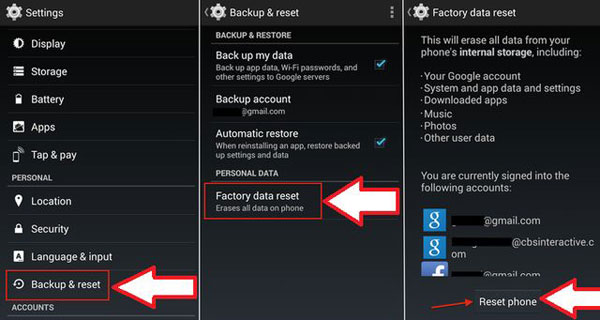
- Perform a factory reset again - Navigate to Backup & Reset > Factory Data Reset, then erase all data on the device.
- Restart and set up the phone - After rebooting, the FRP lock should be bypassed, allowing you to set up the device with a new Google account.
Part 4: RootJunky FRP Bypass: Advantages & Disadvantages
RootJunky FRP Bypass is widely used to bypass Google's Factory Reset Protection on certain Android devices, especially older models. While it offers some practical benefits, it also comes with notable limitations and risks that should be carefully considered.
Pros:
- Free to use with no license or subscription fees required.
- Works well on older Android devices, especially some Samsung models.
- No advanced technical skills required for basic steps in supported devices.
- Can bypass Google FRP lock by exploiting setup wizard loopholes.
- Does not require root access in many cases, making it easier for beginners.
Cons:
- Poor compatibility with newer Android versions and security patches.
- High failure rate on modern devices, especially updated Samsung firmware.
- No official support or updates, making it outdated.
- Security risks from unofficial APK downloads, including malware or spyware.
- Process can be confusing or technical for beginners in some cases.
- Not reliable for long-term use due to constantly patched Android vulnerabilities.
Part 5: The Most Efficient RootJunky FRP Bypass Alternative
Even when dealing with stubborn Android locks, one practical workaround can be found in Android Lock Wiper, which is built to remove both screen locks and Google FRP restrictions on almost all Android devices with even the latest Android 16.
It stands out as a RootJunky FRP Bypass alternative, offering broader device support and smoother operation across various Android versions. With improved compatibility and a higher success rate, it handles modern security updates more effectively than older exploit-based methods.

How to use the best RootJunky alternative for FRP bypass?
- Begin by downloading and installing the software on your computer.
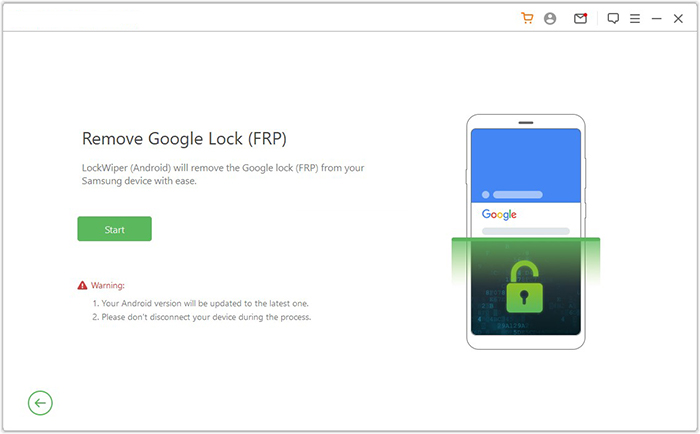
- Once this step is completed, select "Remove Google Lock (FRP)" and choose "Advanced Mode."
- Connect your Android device to the computer using a USB cable, then click "Start."
- It is advisable to back up your Android device to prevent any potential data loss during the FRP bypass process.
- Follow the instructions to enter the necessary information regarding your Android device and click "Next."
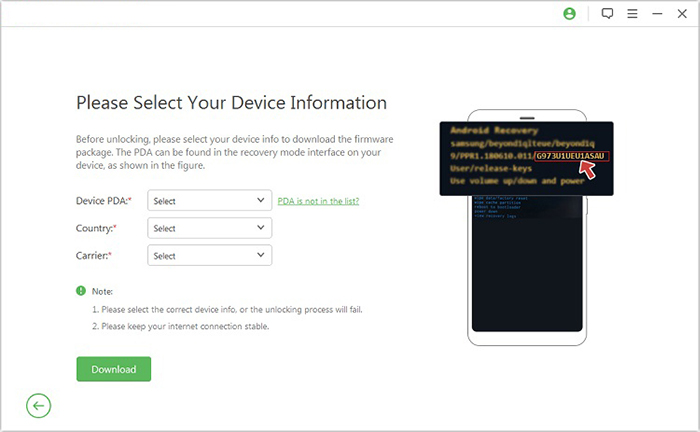
- Follow the on-screen instructions to access recovery mode on your Android device.
- On the subsequent screen, select the appropriate PDA, country, and carrier, then click "Download" to obtain the required data package.
- Afterward, click "Start to Extract," and adhere to the on-screen instructions to place your device into
- Download Mode, enable USB debugging, activate OEM unlock, and extract the firmware along with other critical tasks.
- Finally, the software will commence the unlocking procedure for the Google FRP lock.
FAQs about RootJunky FRP Bypass
Q1. Does RootJunky FRP Bypass still work in 2026?
No, it is largely outdated. Most modern Android devices have patched the vulnerabilities it relies on, so it rarely works on updated systems.
Q2. Why was RootJunky FRP Bypass popular before?
It was popular because it successfully exploited early Android security gaps, allowing users to bypass FRP without paid tools or advanced technical knowledge.
Q3. Can RootJunky FRP Bypass remove Google account permanently?
No, it does not permanently remove FRP. It only bypasses the verification process temporarily by exploiting system loopholes.
Q4. Is RootJunky FRP Bypass legal to use?
Its legality depends on how it is used. While bypassing your own device may be acceptable, using it on stolen or unauthorized devices is illegal in many regions.
Q5. Why does RootJunky FRP Bypass fail on newer phones?
It fails because manufacturers continuously update Android security systems, closing the loopholes that the tool originally exploited.
Q6. What risks are hidden in free FRP bypass APKs?
- Malware or spyware that can steal personal data.
- Privacy risks from excessive or hidden permissions.
- Device crashes or system instability.
- Fake or modified APK files from untrusted sources.
- Low success rate on modern Android versions.
- Possible legal or policy violations when misused.
Key Takeaway: While RootJunky is a legacy workaround that struggles on newer devices, Android Lock Wiper offers a more practical solution with better compatibility, safer operation, and a significantly higher success rate.
Related Articles:
How to Remove Gmail Account from Android? Ways & Influences
How to Mirror Android to Mac without Obstacle? 8 Desirable Ways
Top 7 Ways to Transfer Files from Android to Android (Ultimate Guide)
5 Tactics to Recover Formatted Data from Android Phone with/without Backup
